Most people already carry a book-sized screen everywhere they go. The trouble is that phones are set up for scrolling feeds, not for chapters. This guide shows how to set your phone up for reading, with screenshots from Oasis Reader, though the same ideas work in almost any reading app.
Why phone reading feels harder than it should
Reading a novel on a phone can be lovely. When it isn't, the cause is almost always one of these:
- Text that is too small. Phones default to compact text so more fits on screen, which is great for messages and tiring for chapters.
- A bright white page. A glowing white background is much harsher than paper, especially in dim rooms.
- Cramped lines. Tight line spacing makes your eyes work harder to find the next line.
- Constant interruptions. A notification every few minutes breaks concentration and makes reading feel like work.
- Posture. Holding a phone close to your face, head bent, tires your eyes and neck.
Every one of these is fixable in a minute or two.
1. Make the text bigger than you think
This is the single most effective change. Increase the text size one or two steps beyond what looks "normal". You will turn pages more often, but you will read longer without tiring.
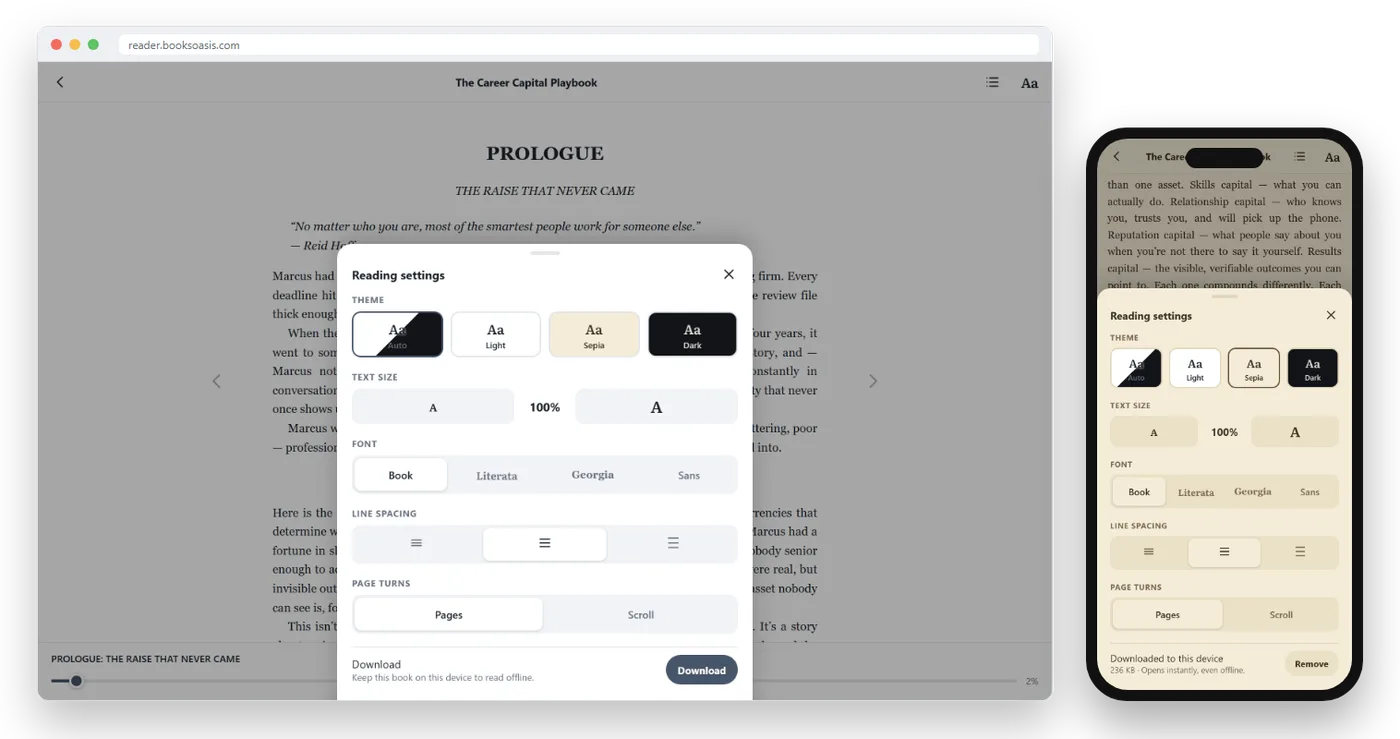
In Oasis Reader, select Aa at the top of the page to open Reading settings, then use the text size control. Changes apply straight away, so you can find your size in seconds.
2. Choose a page color that is kind to your eyes
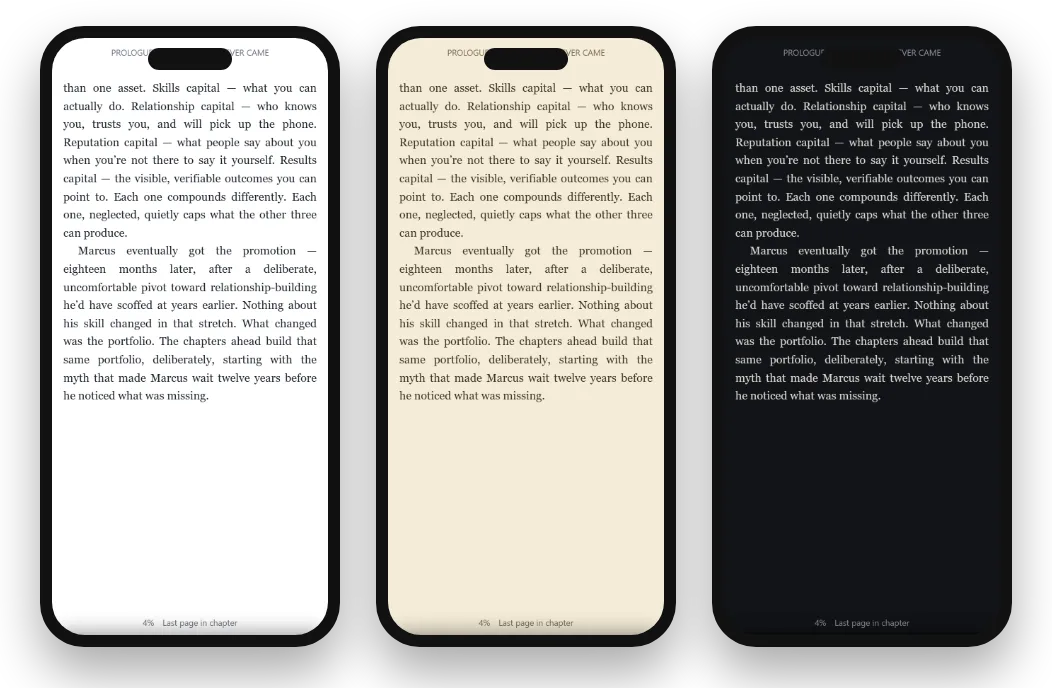
Bright white is the default in most apps and the worst choice for long reading. Try these instead:
| Theme | Best for | Why |
|---|---|---|
| Sepia | Daytime and evening | A warm, paper-like page that softens contrast |
| Dark | Night and dim rooms | Light text on a dark page throws far less light into your eyes |
| Light | Bright sunlight | Highest contrast when the screen competes with the sun |
| Auto | People who don't want to think about it | Follows your phone's light or dark mode through the day |
3. Give the lines room to breathe
Line spacing is underrated. A little more space between lines makes it easier for your eyes to jump from the end of one line to the start of the next, which is exactly where tired readers lose their place.
Oasis Reader offers compact, comfortable and relaxed spacing. Most phone readers do best on comfortable or relaxed.
4. Pick a font you enjoy
A good reading font matters less than size and spacing, but it still helps. Serif fonts like Literata and Georgia feel bookish and are designed for long reading. A clean sans-serif can feel crisper on small, sharp screens.
Oasis Reader lets you keep the book's own typeface, or switch to Literata, Georgia or a sans-serif. Try each for a page and keep the one you forget you are reading.
5. Turn pages or scroll, whichever feels natural
Some people love tapping to turn pages; others prefer scrolling through a chapter like a long article. Neither is better.
- Pages give you a clear sense of place and a satisfying rhythm. Tap the right side to go forward and the left to go back, or swipe.
- Scroll can feel smoother for long chapters and suits one-handed reading.
In Oasis Reader, switch between them under Page turns in Reading settings.
6. Lower the brightness
Many people read with their screen far brighter than they need, especially at night. Turn the brightness down until the page is comfortable but not dim. In a dark room, that is usually much lower than you expect.
If your phone has a warm-color or night-shift setting, it can help in the evening too.
7. Silence the phone while you read
A book asks for sustained attention, and a phone is built to interrupt it. Turn on Do Not Disturb or a Focus mode before you start. Allow calls from favorites if you need to stay reachable.
It sounds small. In practice it is the difference between reading two pages and reading two chapters.
8. Download the book before you need it
Nothing breaks a reading session like a spinning wheel in a tunnel or on a plane. Download your current book to the phone so it opens instantly and needs no connection.
In Oasis Reader there is nothing to do: every book you own is saved to the phone automatically the first time you open the app online. Anything you highlight while offline is saved on the phone and synced when you reconnect. See how to read ebooks offline for the full walkthrough.
9. Hold the phone lower and further away
Hold the phone at chest height, a comfortable arm's bend away, with your chin level rather than tucked. Bigger text (tip 1) is what makes this possible.
Lying down? Prop your elbow on a pillow so the phone stays still without your hand working to hold it.
10. Rest your eyes regularly
A simple habit helps: every 20 minutes, look at something about 20 feet away for about 20 seconds. The end of a chapter is a natural moment to do it.
Blink consciously too. We blink less when we concentrate on screens, which is a big part of why eyes feel dry after reading.
11. Use highlights and notes to stay engaged
Highlighting a line you love, or noting a thought, keeps you actively involved in the book, and it makes finding that passage again easy.
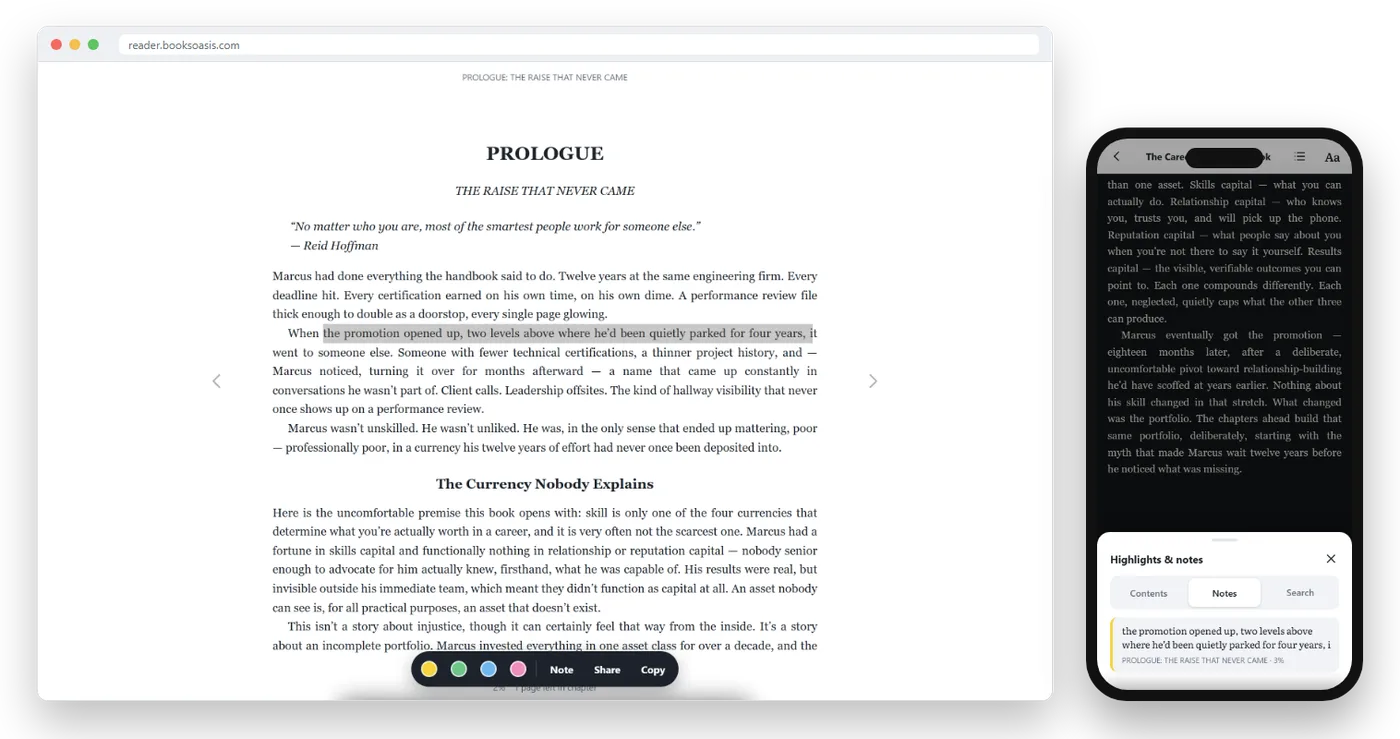
In Oasis Reader, press and hold on a word, drag to select, then pick a color, add a note, define a word, copy a short passage or share it as an image. Every highlight is collected under Notes in the contents panel.
12. Put your reading app where your thumb goes
Habit is half of reading more. Put your reading app on the first home screen, in the spot your thumb lands on without thinking, ideally where a social app used to be.
Oasis Reader has an Android app, and on any phone it can sit on your home screen and open full screen like any app:
- iPhone: open reader.booksoasis.com in Safari, tap Share, then Add to Home Screen.
- Android: download the Oasis Reader app from reader.booksoasis.com (tap Get the Android app), or open the site in Chrome and choose Install app from the menu.
Turn spare minutes into a reading habit
The real advantage of phone reading isn't comfort. It is that your book is always with you. A few habits help you use that:
- Read in the gaps. Queues, waiting rooms, the bus, the kettle boiling. Ten minutes a day adds up to around a book a month for many readers.
- Replace one scroll. When you reach for a social app out of habit, open your book instead, just for one page.
- Read the same time each day. A chapter with morning coffee or before sleep makes reading automatic.
- Keep the next book ready. Finishing a book with nothing lined up is where habits stall. Keep one or two waiting in your library.
- Read a series. A series you enjoy pulls you straight into the next book.
Help for tired, older or low-vision eyes
If small text is genuinely hard for you, go further than one or two sizes. Very large text on a phone is perfectly readable; you just turn pages more often.
- Use the Dark theme for maximum contrast between text and page.
- Choose a clear font and relaxed line spacing.
- Turn on your phone's own accessibility options, such as larger system text, bold text and the built-in read-aloud feature.
- A tablet gives you the same comfort with more words on each page.
A quick setup checklist
| Setting | Recommended starting point |
|---|---|
| Text size | One or two steps larger than default |
| Theme | Sepia by day, Dark at night, or Auto |
| Line spacing | Comfortable or relaxed |
| Font | Literata or Georgia for long reading |
| Page turns | Try both, keep the one you forget about |
| Brightness | As low as stays comfortable |
| Notifications | Do Not Disturb while reading |
| Download | On, for your current book |
Reading in bed without keeping yourself awake
Bedtime is when many people read most, and when a phone can work against you. A few adjustments help:
- Switch to the Dark theme and turn brightness right down before you get into bed.
- Turn on your phone's night or warm-color setting in the evening.
- Choose a calmer book for bedtime; save the page-turning thriller for the commute.
- Set a gentle limit, such as one chapter, so "one more page" doesn't become midnight.
Phone, tablet or e-reader?
Once your phone is set up well, you may find you don't need anything else. Here is how the options compare for everyday reading:
| Phone | Tablet | E-reader | |
|---|---|---|---|
| Always with you | Yes | Sometimes | Sometimes |
| Comfort for long sessions | Good when set up well | Very good | Excellent |
| Reading in sunlight | Fair | Fair | Excellent |
| Extra cost | None | Often none, if you own one | A new device |
| Books from many stores | Yes, one app per store | Yes, one app per store | Usually one store per brand |
If you are weighing up a dedicated device, read do you need an e-reader?
Reading on your phone with BooksOasis
- Every ebook opens in Oasis Reader within seconds of buying it.
- Light, Sepia, Dark and Auto themes, adjustable text, fonts and spacing.
- Offline downloads, and your place and notes follow you to your tablet or computer.
Good to know: BooksOasis ebooks are read inside Oasis Reader rather than downloaded as files, and they don't open on Kindle or Kobo e-readers.
Find something to readBooks that suit phone reading
Gripping reads for spare minutes.
In short
A phone can be a wonderful place to read once it is set up for books rather than feeds. Bigger text, a warm or dark page, a little more line spacing, silence and a downloaded book do most of the work. Add good posture and regular breaks, and you may find yourself reading more than ever, in all the small moments you used to spend scrolling.
Questions
Is reading on a phone bad for your eyes?
Reading on a phone isn't harmful in itself, but small text, bright white pages and long sessions without breaks can cause eye strain. Larger text, a sepia or dark theme and regular breaks make a big difference.
What is the best theme for reading on a phone?
Sepia suits most people during the day, and a dark theme suits reading at night. Many apps offer an Auto setting that switches with your phone's light or dark mode.
Should I turn pages or scroll?
Whichever feels natural. Page turns keep your place clearly; scrolling can feel smoother for long chapters. Try both for a few pages.
How do I stop notifications interrupting my reading?
Turn on Do Not Disturb or a Focus mode while you read. You can allow calls from favorites so you don't miss anything urgent.
Can I read the same book on my phone and tablet?
Yes, in any app that syncs. Oasis Reader saves your place, highlights and notes to your account, so you carry on where you stopped on any device you sign in to.
Does reading on a phone use a lot of data?
Very little once a book is downloaded. Ebooks are small files, and downloaded books read with no connection at all.
What size phone is best for reading ebooks?
Any modern phone works well once text and spacing are set up. Larger phones show more words per page and suit long sessions, but a small phone with bigger text is perfectly comfortable for daily reading.
Put a good book on your phone tonight
It opens in Oasis Reader seconds after you buy it.