Most of us finish a good book and, a month later, remember only a vague impression. That isn't a memory problem; it is a method problem. A few simple habits change it completely. This guide shows how, with examples from Oasis Reader, though the approach works in any reading app.
Why we forget books
Reading feels like learning, but much of it slips away quickly unless we do something with it. Psychologists have long observed that memories fade fastest in the first days after learning, unless we revisit them. Re-reading passively helps little; retrieving and explaining ideas helps a lot.
That is why the habits below focus on doing something with what you read: choosing, rephrasing and reviewing.
How to highlight well
- Finish the paragraph first. Highlight after you understand the point, not while you are still reading it.
- Choose the core sentence. Highlight the one line that carries the idea, not the whole paragraph.
- Ask "will I want this again?" If not, leave it.
- Aim for a few per chapter. Three to five highlights a chapter is plenty for most books.
A simple color code
Colors turn a long list of highlights into something you can scan in seconds. Oasis Reader offers four colors; here is one way to use them:
| Color | Use it for |
|---|---|
| Yellow | Key ideas and main arguments |
| Green | Quotes you love or want to share |
| Blue | Facts, names, dates and definitions |
| Pink | Questions, disagreements and things to follow up |
The exact code matters less than using the same one in every book.
Highlighting in Oasis Reader
Select some text: press and hold on a phone or tablet, or drag with your mouse on a computer. A toolbar appears with:
- Four highlight colors: yellow, green, blue and pink.
- Note: highlight the passage and add your own thoughts.
- Define: look up a word without leaving the page.
- Share: turn the passage into a quote image.
- Copy: copy a short passage, up to 400 characters at a time.
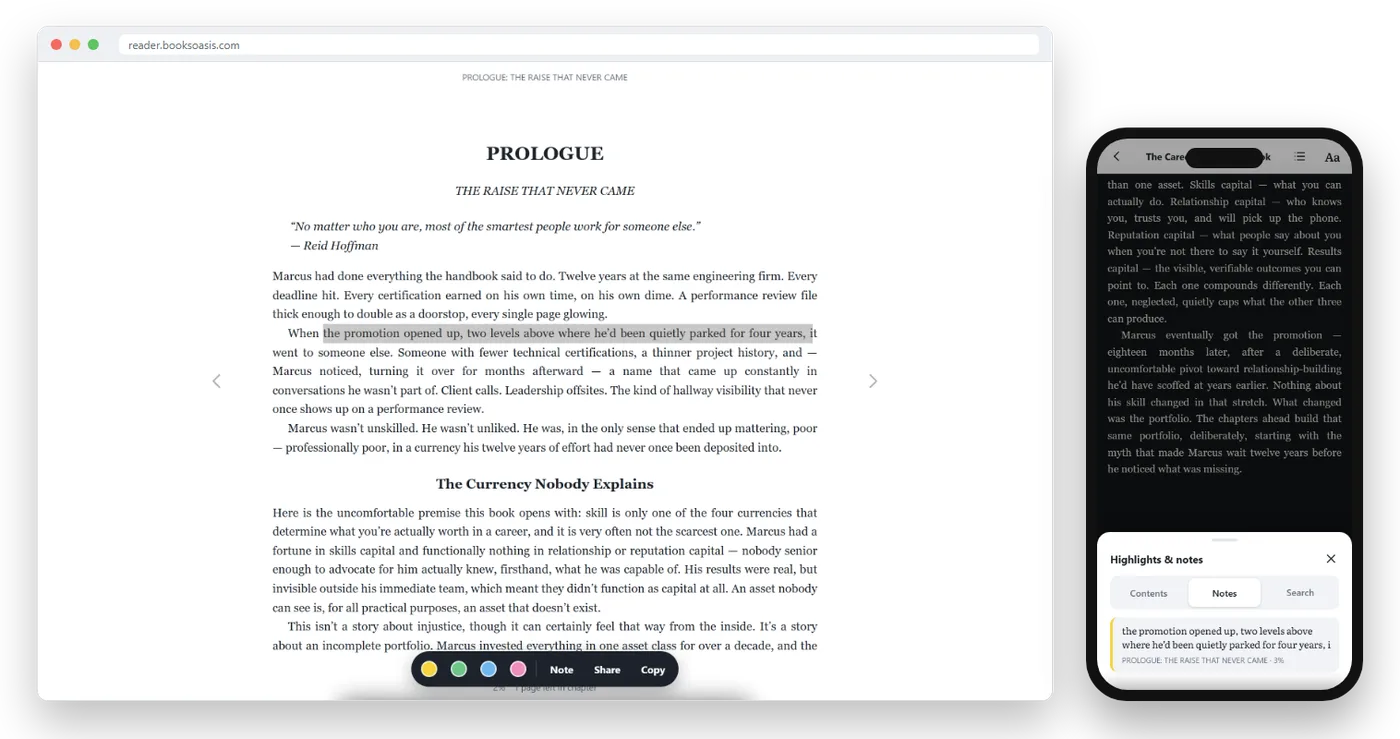
Select an existing highlight to change its color, edit its note, share it or delete it.
Writing notes that are actually useful
A highlight marks what the author said. A note records what you think. That is where memory forms. Good notes are short and in your own words:
| Weak note | Strong note |
|---|---|
| "Important." | "Why the Republic failed: rivals combined outside the rules." |
| "Good quote." | "Use this in the team talk on setbacks." |
| "?" | "Disagree: this ignores the cost of waiting. Check chapter 7." |
Useful note types: a one-line summary, a question, a disagreement, a connection to another book, or an action you will take.
Finding everything again
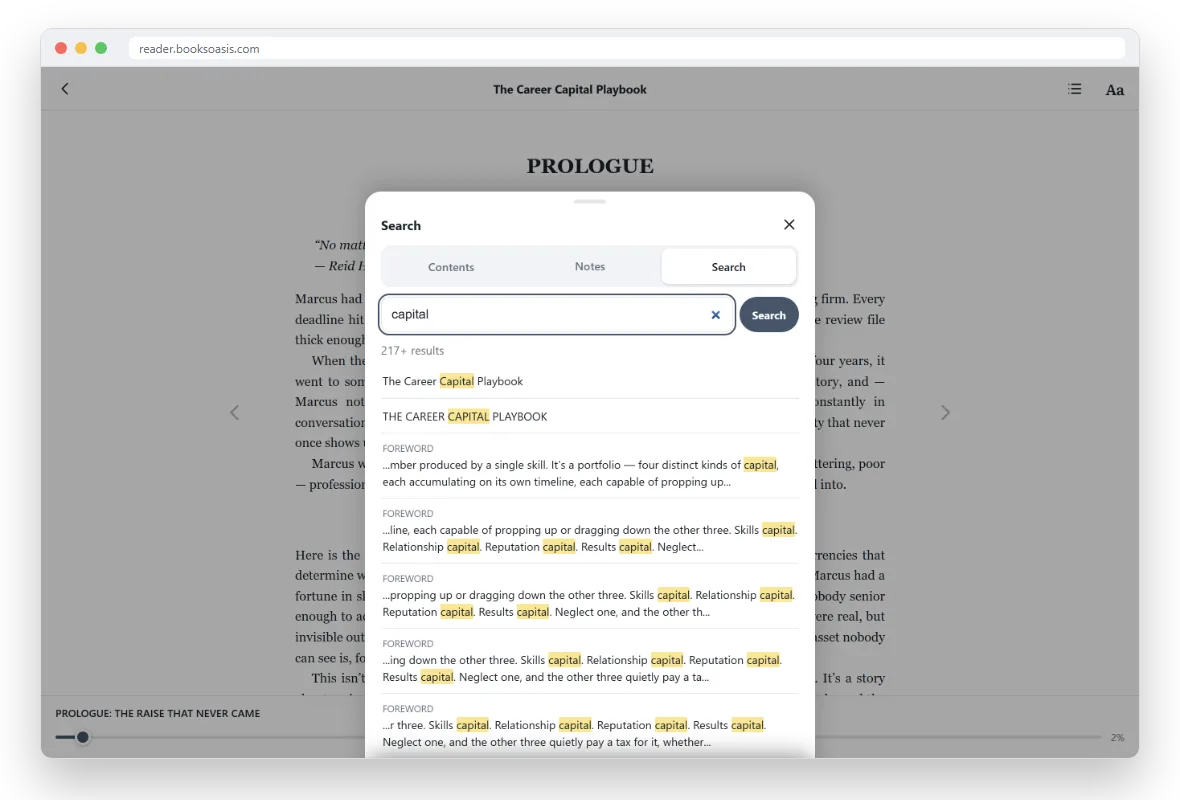
In Oasis Reader, open the contents panel and choose the Notes tab to see every highlight and note in the book, in order. Tap one to jump to that passage.
The Search tab finds every place a word or phrase appears, with a snippet of the text around it, which is ideal for tracking a character, a term or a theme.
The review routine that makes it stick
- End of each chapter (2 minutes).Skim that chapter's highlights and write a one-line summary note.
- End of the book (15 minutes).Read all your highlights and notes. Pick the ten that matter most.
- Write a short summary.In your own words: what the book argues or shows, and what you will do with it.
- One week later (5 minutes).Re-read your summary and your top highlights without the book.
- Tell someone.Explaining a book to a friend is one of the best memory tools there is.
Active reading, before and during the book
Memory starts before the first highlight. A few minutes of preparation make every note more useful:
- Preview. Read the description, contents and first and last paragraphs of a chapter before reading it properly.
- Ask a question. Decide what you want to learn: "Why did the Republic fall?" or "How do I build a habit that lasts?"
- Read to answer it. Highlight what answers your question.
- Summarize. At the end of the chapter, answer your question in one sentence as a note.
This simple loop turns reading from something that happens to you into something you do.
Building a personal library of ideas
Over time, your highlights can become a personal library of what you have learned. Many readers keep one notes document per book, with the summary, top highlights and actions, plus a running list of themes across books: leadership, habits, faith, history. When a theme comes up in a new book, you add to it. After a year, you have your own reference book, drawn from everything you have read.
Memorizing passages
For lines you want to carry with you, such as a verse in a devotional, a Stoic principle or a favorite quote, memory needs repetition spaced over time. Copy the line into a note, read it aloud each morning for a week, then every few days. Short, regular recall works far better than one long session.
Highlights for book clubs
Book clubs are where highlights shine. Use one color for "discuss this", and add a question as a note. Before the meeting, open the Notes list and you have your talking points ready. If everyone reads on their own account, each person brings a different set of highlights, which makes for a richer conversation.
Slow down for the books that matter
Not every book needs this treatment. Enjoy novels at whatever pace you like. For the few books a year you want to change how you think or act, read more slowly, highlight carefully and review properly. Five books remembered well are worth more than twenty half-forgotten.
Different books, different approaches
| Type of book | How to highlight |
|---|---|
| Self-help and business | Actions and principles; note what you will try and when |
| History and biography | Turning points, names and dates; note causes and consequences |
| Devotionals | Lines to pray or memorize; note how they apply to your day |
| Fiction | Lines you love and moments that surprised you; keep it light |
| Study texts | Definitions and arguments; note questions for class |
Sharing what you read
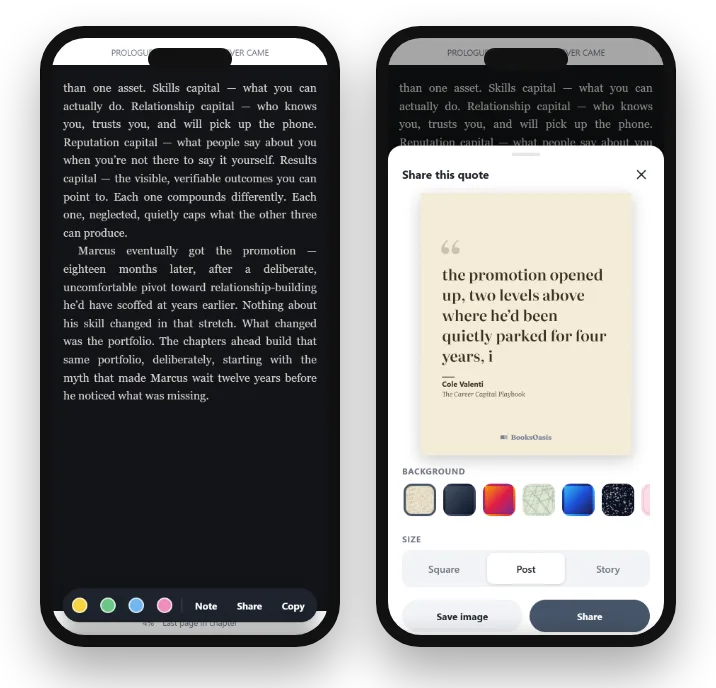
Sharing a favorite line is another way to remember it. In Oasis Reader, choose Share on any passage to make a quote image with the book's title and author, in square, post or story sizes, then save it or send it to another app.
Highlights across devices and offline
Your highlights and notes are saved to your account, so they follow you between phone, tablet and computer. Anything you highlight while offline is saved on your device first and added to your account when you reconnect. That means you can highlight on a plane and review on your laptop later.
A worked example
Imagine reading a history of the fall of the Roman Republic. Your question before starting: "How did three men bend the Republic's rules?" In chapter one, you highlight three sentences in yellow (the key moves), one date in blue (60 BC), and one striking line in green. At the end of the chapter, you add a note: "Each had what the others lacked: glory, money, political skill." A week after finishing, you re-read your summary and can explain the whole story to a friend in two minutes. That is a book remembered.
Using notes with children and students
Highlighting and note-taking are skills worth teaching. Ask a young reader to highlight one favorite sentence per chapter and write why they liked it. For students, set a question before each chapter and ask for a one-line answer as a note. Small, regular practice builds a habit that pays off for life.
Common mistakes
- Highlighting everything. If half the page is yellow, nothing stands out.
- Never reviewing. Highlights you never revisit are just decoration.
- Copying instead of thinking. Long copied passages feel productive but teach little.
- Changing your color code. Consistency makes review fast.
- Reading too fast. Speed is the enemy of memory for books you want to keep.
Highlights and notes in Oasis Reader
- Four highlight colors, notes, Define, Share and Copy.
- Every highlight and note listed under Notes; search inside the book.
- Synced across devices, including highlights made offline.
Books worth highlighting
Books that reward a highlighter.
In short
Remembering books is a skill, not a talent. Highlight less, write notes in your own words, use a consistent color code, and review after each chapter and again a week later. With your highlights saved, searchable and synced, every book you read can keep paying you back long after the last page.
Questions
How can I remember more of what I read?
Read actively: highlight selectively, write a short note in your own words for key passages, and review your highlights within a day and again a week later. Retelling a book's ideas to someone else also helps a lot.
Should I highlight a lot?
No. Highlighting everything is the same as highlighting nothing. Aim for the few passages that surprise you, change your mind or you will want to find again.
What is the best way to review highlights?
Read through them soon after finishing a chapter, then again after finishing the book. Turn the best ones into a short summary in your own words.
Can I highlight in Oasis Reader?
Yes. Select text to highlight it in yellow, green, blue or pink, add a note, look up a word, share it as a quote image or copy a short passage. All highlights are listed under Notes in the contents panel.
Do my highlights sync between devices?
In Oasis Reader, yes. Highlights and notes are saved to your account and follow you between phone, tablet and computer, including ones made offline once you reconnect.
Can I export my highlights?
In Oasis Reader, highlights and notes are listed under Notes for each book, and you can copy short passages up to 400 characters at a time into your own notes.
Is it better to take notes on paper?
Writing by hand can help memory, but ebook notes are searchable, synced and stay with the passage. Many readers highlight in the ebook and write a short summary by hand at the end.
How many highlights per book is too many?
If you are highlighting most paragraphs, it is too many. For most non-fiction, a few per chapter is enough to capture what matters.
Can I highlight while offline?
Yes. In Oasis Reader, highlights and notes made offline are saved on your device first and added to your account when you reconnect.
Can I change a highlight's color later?
Yes. In Oasis Reader, select an existing highlight to change its color, edit or add a note, share it or delete it.
Does highlighting slow down reading?
A little, and that is the point for books you want to remember. For light reading, skip highlighting and simply enjoy the book.
What is the Define option?
Define looks up the meaning of a selected word without leaving the page, which is handy for unfamiliar terms in history and non-fiction.
Are my notes private?
Yes. Your highlights and notes are saved to your own account and aren't shown to other readers.
Where do I find all my highlights in Oasis Reader?
Open the contents panel in the book and choose the Notes tab. Every highlight and note is listed in the order it appears in the book.
Read something worth remembering
Highlight, note and review in Oasis Reader, on any device.