E-readers are lovely devices, and marketing makes them feel essential. But millions of people read happily on the phones and tablets they already own. This guide compares the three honestly, so you can decide whether a new device would genuinely improve your reading.
Phone vs tablet vs e-reader at a glance
| Phone | Tablet | E-ink e-reader | |
|---|---|---|---|
| Extra cost | None | None if you own one | A new device |
| Always with you | Yes | Sometimes | Sometimes |
| Screen | Bright, sharp, small | Bright, sharp, large | Paper-like, not backlit |
| Reading in sunlight | Fair | Fair | Excellent |
| Reading in bed | Good with dark mode | Good with dark mode | Excellent with front light |
| Battery | A day | A day or two | Weeks |
| Distractions | Many | Some | Almost none |
| Books from many stores | Yes, one app per store | Yes, one app per store | Usually one store per brand |
| Color and images | Excellent | Excellent | Limited (color e-ink is improving) |
Reading on a phone
A phone's great advantage is that it is always there: in queues, on the bus, in waiting rooms and at lunch. Ten minutes here and there adds up to a lot of reading.
The common complaints, eye strain and small text, are usually about settings rather than the phone itself. Increase the text size one or two steps, choose a sepia or dark theme, add more line spacing and turn the brightness down. See how to read ebooks on your phone comfortably.
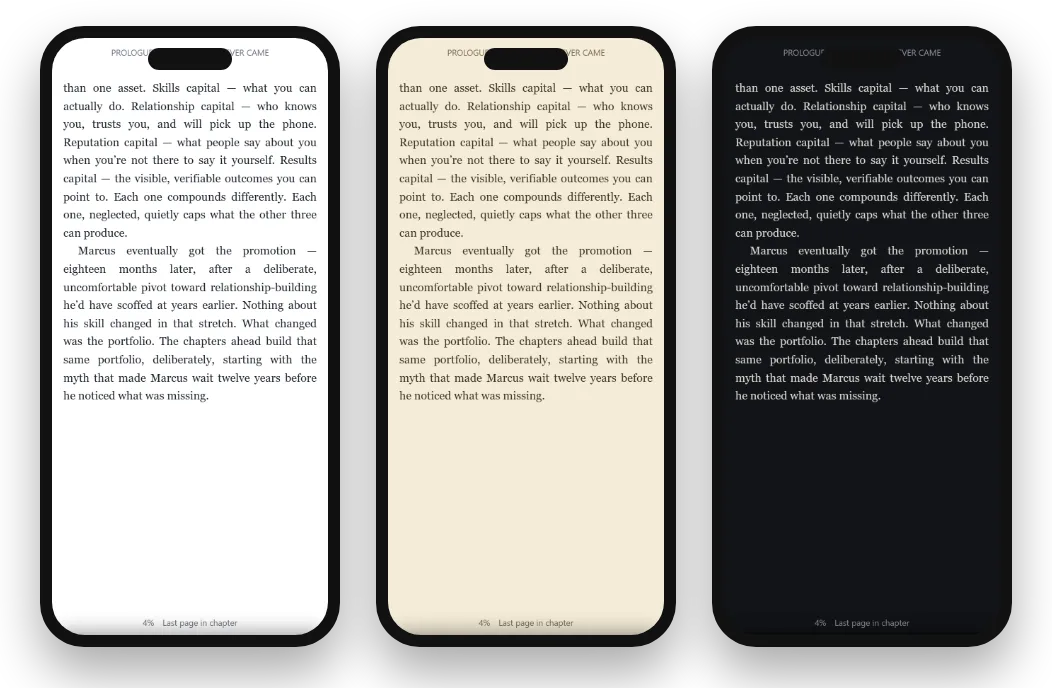
Best for: reading in spare moments, commuters, and anyone who doesn't want another device.
Watch out for: notifications. Turn on Do Not Disturb while reading.
Reading on a tablet
A tablet gives you a larger page, more words per screen and room for illustrations, maps, comics and PDFs. It is excellent for long evening sessions on the sofa and for non-fiction you want to study.
It is heavier than a phone or e-reader, less comfortable to hold in one hand for long, and the battery lasts a day or two rather than weeks.
Best for: illustrated books, cookbooks, textbooks, comics, and readers who want a big page.
Reading on an e-ink e-reader
E-readers use e-ink screens that reflect light like paper rather than shining it at you. Many people find them more comfortable for hours of reading, and they are readable in bright sunlight where phones struggle. Most have adjustable front lights, often with warm tones, for reading in the dark.
They are also wonderfully free of distractions: no notifications, no social media, just the book. And the battery lasts weeks.
The trade-offs: an extra device to buy and carry, limited color, slower page refreshes, and in most cases your library is tied to one store's ecosystem, such as Kindle or Kobo.
Best for: heavy readers, holiday and beach readers, and people who find screens tiring.
What about your eyes?
Eye comfort is the main reason people consider an e-reader. A few facts help:
- Any screen can tire your eyes if the text is small, the page is bright white in a dark room, or you read for long stretches without breaks.
- E-ink is more paper-like, and many people find it easier for very long sessions.
- Settings matter a lot on phones and tablets: larger text, a warm or dark theme and lower brightness make a big difference.
- Breaks help on every device. Every 20 minutes or so, look at something far away for a few seconds.
If you have persistent eye discomfort, it is worth seeing an optician, whatever device you read on.
The cost question
An e-reader is a real expense on top of the books themselves. If you read a book or two a month, the device can cost more than a year of books. If you read several books a week, the comfort may easily justify it.
| Reading habit | Probably enough | Worth considering |
|---|---|---|
| A book a month, in spare moments | Your phone | - |
| Several books a month, mostly at home | A tablet or phone | An e-reader if screens tire you |
| A book or more a week | - | An e-reader |
| Lots of reading outdoors or on holiday | - | An e-reader |
| Illustrated or technical books | A tablet | - |
The ecosystem question
Buying an e-reader usually means choosing a store as well. Kindle devices read Kindle books; Kobo devices read Kobo books and many other EPUB files. Books bought in one store generally can't be moved to another brand's device.
Phones and tablets avoid this: you can install several reading apps and read books from many stores on one device. If you like buying from different places, that flexibility is a real advantage.
Reading for children and teenagers
For young readers, the question is often distraction rather than comfort. A phone or tablet brings games and messages within one tap; an e-reader offers nothing but books. Many parents find an e-reader, or a tablet with focus settings and parental controls, keeps reading time about reading. For picture books and illustrated stories, a tablet's color screen is far better.
Accessibility and large text
Readers with low vision often prefer phones and tablets, which offer very large text, high-contrast dark themes, bold fonts and built-in screen readers that read the page aloud. E-readers also enlarge text well, but a tablet's larger, brighter screen combined with accessibility settings is often the most comfortable option for people who find small print hard.
Sharing devices at home
An e-reader tends to belong to one person and one store account. A family tablet or computer can be shared more easily, with each reader signing in to their own account in a reading app, so everyone keeps their own books, place and notes. Browser-based readers make this especially simple: sign in, read, sign out.
Reading while traveling
For long trips, an e-reader shines: weeks of battery, readable at the pool or beach, and light to pack. But a phone with downloaded books does the job too, and you are carrying it anyway. Whatever you use, download your books before you go, so you can read with no signal. See how to read ebooks offline.
A fourth option: your computer
Laptops and desktops are underrated for reading, especially non-fiction you want to take notes from, or reading during a lunch break at work. Browser-based readers such as Oasis Reader and Kindle for web need nothing installed. See reading ebooks on a laptop or Chromebook.
Three example readers
The commuter
Reads 20 minutes each way on a crowded train, a book every couple of weeks. A phone with a downloaded book and Do Not Disturb on is ideal; an e-reader would add little.
The holiday binge reader
Reads little during the week, then five books on a beach holiday. An e-reader's sunlight readability and battery life make it worth having.
The student
Reads non-fiction, highlights heavily and writes notes. A laptop or tablet, with the book beside her notes, suits her better than any e-reader.
Try this before you buy
- Set up your phone or tablet properly.Bigger text, sepia by day, dark at night, relaxed spacing.
- Read one full book on it.A week or two of normal reading tells you far more than a minute in a shop.
- Note what bothers you.Eye strain? Glare outdoors? Battery? Distractions?
- Decide with evidence.If the problems are ones only e-ink solves, an e-reader will be worth it.
Reading on BooksOasis without buying a device
BooksOasis ebooks open in Oasis Reader, which runs in the browser on any phone, tablet or computer, and can be added to your home screen like an app. It has Light, Sepia, Dark and Auto themes, adjustable text, fonts and spacing, offline downloads, and highlights and notes that follow you between devices.
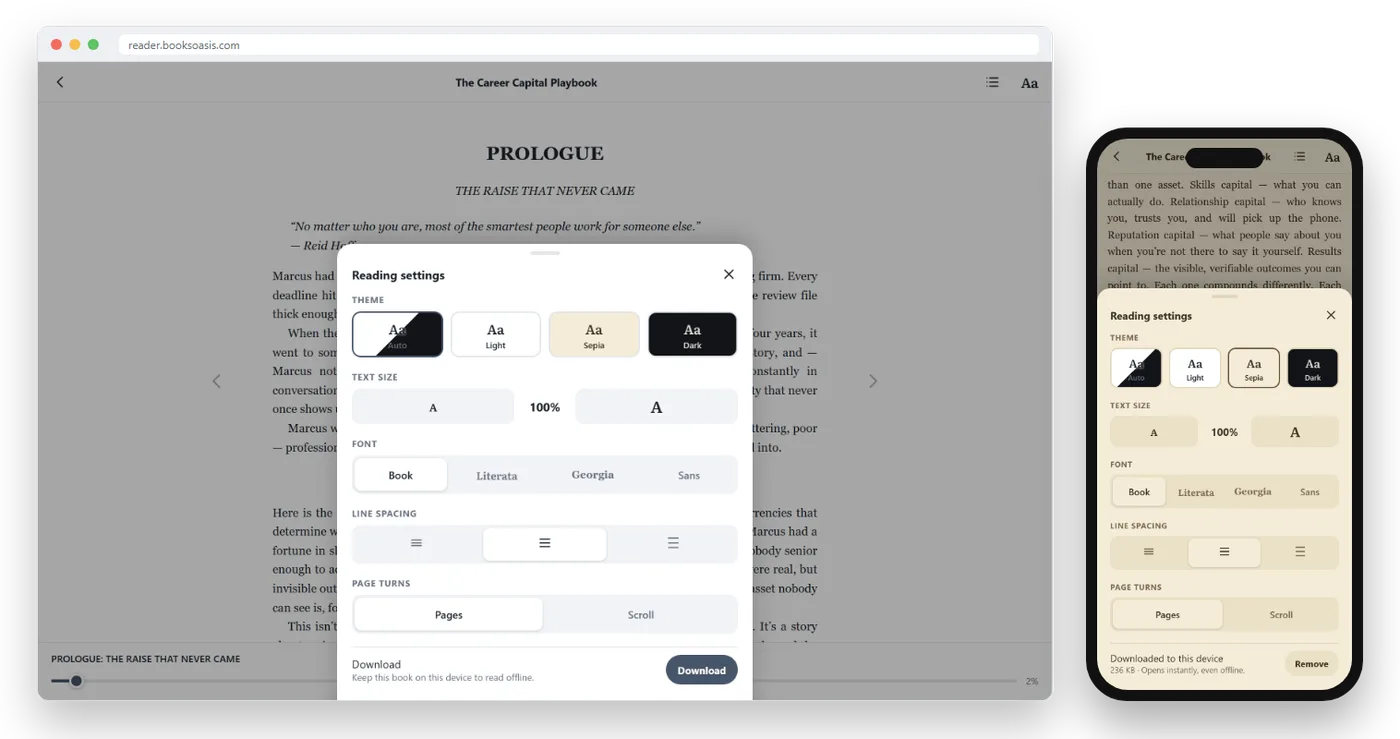
Where BooksOasis fits
- Read on the screens you already own, with nothing to buy.
- Comfort settings that make phone and tablet reading easy on the eyes.
- Your place, highlights and notes follow you between devices.
What it doesn't do: BooksOasis ebooks don't open on Kindle or Kobo e-ink readers, and aren't downloaded as files.
Browse ebooksIf you do buy an e-reader
- Choose the store first. Pick the ecosystem where you want your books to live.
- Look for a warm front light for comfortable night reading.
- Consider page-turn buttons if you read one-handed.
- Check library borrowing in your country.
- Keep your phone apps for books from other stores.
For the big two, read Kindle vs Kobo.
Popular books to try on your phone or tablet
Try one on your phone before you buy a device.
In short
An e-reader is a wonderful tool for heavy, outdoor and screen-weary readers, but it isn't a requirement. Set up your phone or tablet well, read a whole book on it, and let that experience decide. Most readers find the device they already carry is a better reading companion than they expected.
Questions
Is an e-reader better for your eyes than a phone?
E-ink screens don't shine light straight at you and look more like paper, which many people find more comfortable for long sessions. A phone set up with larger text and a sepia or dark theme is comfortable for most people too.
Can I read ebooks on my phone instead of a Kindle?
Yes. Kindle, Kobo, Apple Books, Google Play Books and Oasis Reader all work on phones, and some also work in a web browser.
How long does an e-reader battery last?
Typically weeks on a charge with normal reading, far longer than a phone or tablet.
Is a tablet good for reading ebooks?
Yes, especially for illustrated books, comics, magazines and PDFs, and for reading with a larger screen. It is heavier and has a shorter battery life than an e-reader.
Do BooksOasis ebooks work on e-readers?
BooksOasis ebooks open in Oasis Reader on phones, tablets and computers. They don't open on Kindle or Kobo e-ink readers.
Are e-readers worth it for occasional readers?
Usually not. If you read a book or two a month, your phone or tablet set up with comfortable settings is likely enough, and the money is better spent on books.
Can I read library books without an e-reader?
Yes. Libby lets you borrow library ebooks on phones, tablets and computers.
Is reading on a phone at night bad for sleep?
Bright screens late at night can make it harder to wind down. A dark theme, low brightness and your phone's night or warm-color setting help a lot.
Which is better for reading PDFs?
A tablet or computer. PDFs have fixed pages that are hard to read on small phone screens and most e-ink readers, while a larger screen shows a whole page comfortably.
Do color e-readers solve the image problem?
They help. Color e-ink screens show covers and simple illustrations, but colors are softer than on a tablet, so photo-heavy and picture books still look best on a phone or tablet.
Can I use an e-reader and a phone together?
Yes. Many readers use an e-reader at home and their phone on the go. Apps that sync keep your place, so you can switch devices within the same store.
What size tablet is best for reading?
A 7 to 8 inch tablet is light enough to hold like a book; 10 to 11 inches suits illustrated books, PDFs and reading at a table.
Can I try Oasis Reader before buying a device?
Yes. Buy any ebook and open it in Oasis Reader in your phone, tablet or computer browser. No device purchase is needed.
Start reading on the screen you already have
Buy an ebook and read it in seconds on your phone, tablet or computer.