Reading apps have become genuinely good. Most now offer themes, offline downloads, highlights, notes and sync between devices. The real differences are which books each app can open and how pleasant it is to live in every day. This guide compares the main ones.
Store apps vs file readers: the one thing to understand
There are two kinds of reading app, and mixing them up causes most of the confusion.
Store apps belong to a bookstore. They open the books you bought in that store, and usually nothing else. Kindle, Kobo, Apple Books, Google Play Books and Oasis Reader are store apps.
File readers don't sell books. They open ebook files you already have, such as DRM-free EPUBs from authors or free classics. Moon+ Reader is a popular example on Android.
Because most store books are protected, no single app can open every book you own. That is why most readers end up with a store app or two and a library app.
The best ebook apps compared
| App | Type | Android | iPhone and iPad | Computer | Best for |
|---|---|---|---|---|---|
| Kindle | Store | Yes | Yes | Yes (app and web) | Amazon's catalog, Kindle Unlimited |
| Kobo | Store | Yes | Yes | Desktop app | Kobo buyers and Kobo Plus |
| Apple Books | Store | No | Yes | Mac only | All-Apple households |
| Google Play Books | Store and uploads | Yes | Yes | Web | Android users and your own files |
| Libby | Library | Yes | Yes | Web | Free borrowing |
| Moon+ Reader | File reader | Yes | No | No | DRM-free EPUBs on Android |
| Oasis Reader | Store | Yes (Android app or browser) | Yes (browser or installed) | Yes (Windows app or browser) | BooksOasis ebooks on any screen |
Platform support as generally available at the time of writing.
Kindle: the default for most readers
The Kindle app is polished, fast and available almost everywhere, including a web version for computers. If you buy from Amazon or use Kindle Unlimited, it is the obvious app.
Strengths: huge catalog, good sync, X-Ray and dictionary features. Limits: opens only Amazon books and personal documents sent through Send to Kindle.
Kobo: clean and reader-friendly
Kobo's app is simple and pleasant, with good reading statistics and easy access to Kobo Plus if you subscribe. It pairs naturally with a Kobo e-reader.
Strengths: tidy design, reading stats, international store. Limits: no web reader, and it is mainly for books bought from Kobo.
Apple Books: beautiful, but Apple only
Apple Books is pre-installed on iPhones and iPads and looks wonderful. It also opens DRM-free EPUB and PDF files you add to it.
Strengths: design, smooth page turns, handles your own files. Limits: no Android or Windows version, so your library is stuck with Apple devices.
Google Play Books: the flexible all-rounder
Google Play Books works on Android, iPhone and the web, and lets you upload your own EPUB and PDF files to your library.
Strengths: cross-platform, uploads, good text-to-speech on Android. Limits: discovering new books feels more like searching than browsing.
Libby: the best free app
Libby, from OverDrive, lets you borrow ebooks and audiobooks with a library card. It is free, well designed and works on phones, tablets and the web.
Strengths: completely free, audiobooks too. Limits: hold lists for popular titles, and loans expire.
Moon+ Reader: for your own files on Android
Moon+ Reader is a long-standing Android favorite for reading DRM-free EPUB and other files you have downloaded. It is highly customizable, from fonts and margins to page-turn animations.
Strengths: deep customization, opens many formats. Limits: Android only, and it can't open protected books from stores.
Oasis Reader: built for any screen
Oasis Reader is the reading app for BooksOasis ebooks. It runs in your web browser at reader.booksoasis.com, so it works on Android, iPhone, iPad, Windows, Mac and Chromebook with nothing to download from an app store.
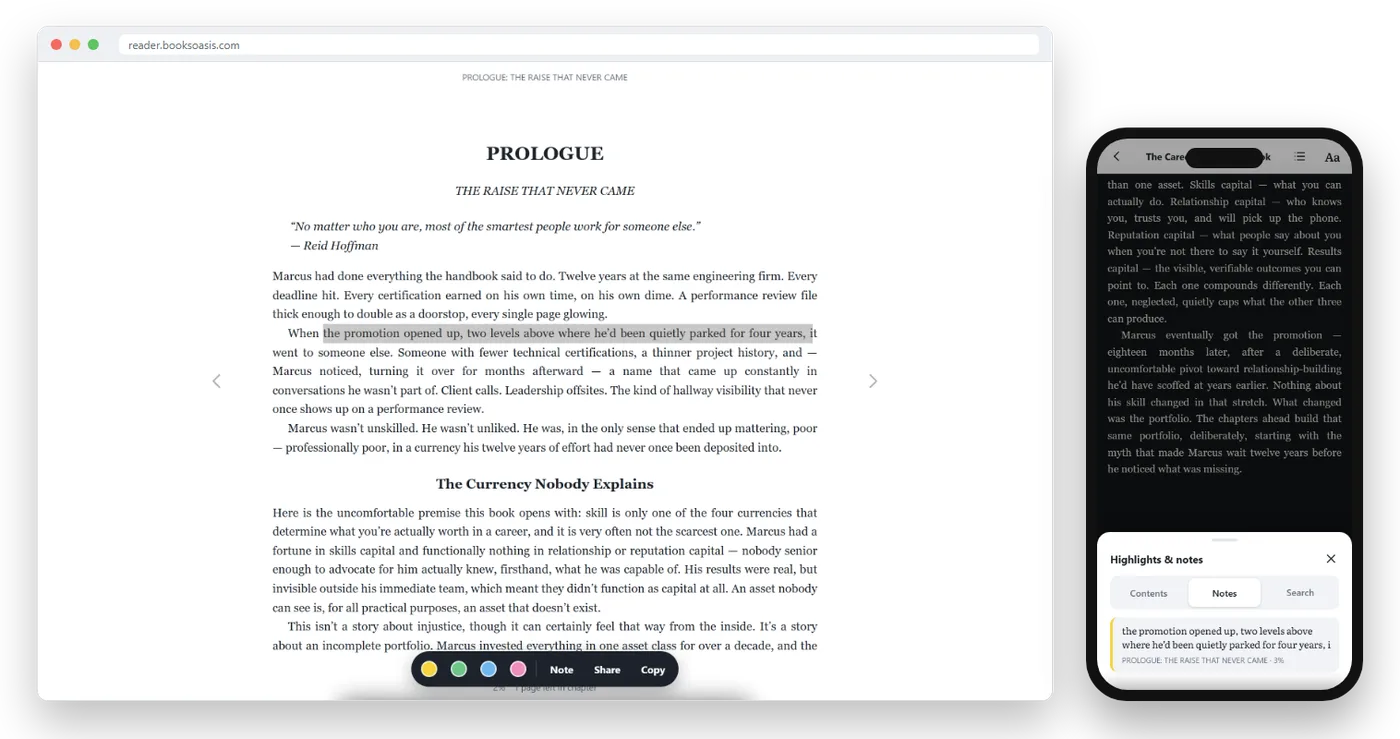
Here is what it does:
- Themes: Light, Sepia and Dark, plus Auto to follow your device.
- Text: adjustable size, a choice of fonts, and three line-spacing settings.
- Page turns: turn page by page, or scroll through each chapter.
- Contents and search: jump to any chapter or find every mention of a word.
- Highlights and notes: four colors, your own notes, all listed in one place.
- Quote images: turn a passage into an image in square, post or story size.
- Offline: download a book to your device and read without a connection.
- Sync: your place, highlights and notes follow you across devices.
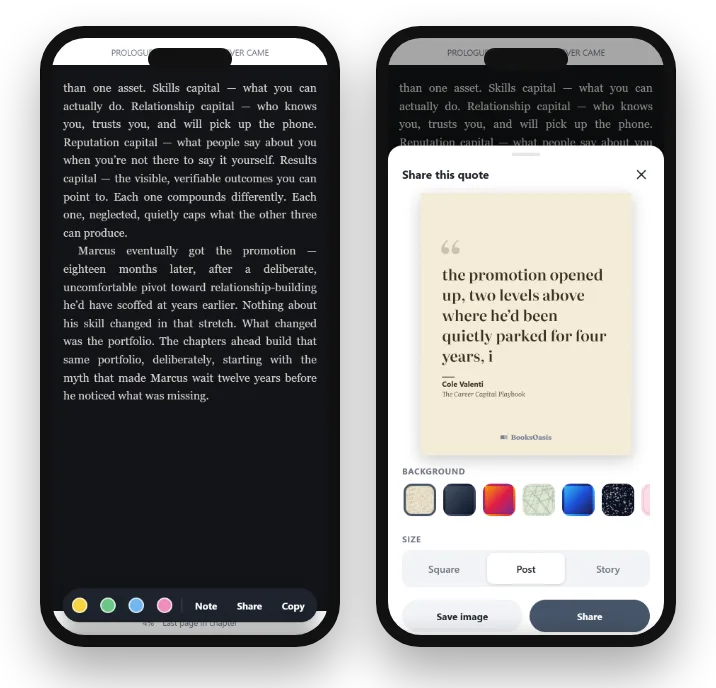
Add it to your home screen and it opens full screen, like any installed app. On iPhone, use Share then Add to Home Screen in Safari; on Android, use Install app in Chrome's menu.
Where Oasis Reader fits
- The easiest way to read BooksOasis ebooks on any device, including work laptops and Chromebooks.
- No app store needed, and your library is ready the moment you sign in.
- Offline downloads, synced notes and a full set of comfort settings.
What it doesn't do: it opens only books bought on BooksOasis, not files from other stores, and it doesn't send books to Kindle or Kobo e-readers.
Find a book to readThe best app for particular needs
Some readers have specific needs that narrow the choice quickly.
Larger text and low vision
Look for generous text sizes, bold or high-contrast themes and good line spacing. All the store apps above let you enlarge text a long way; a dark theme with light text often helps too. Your phone's own accessibility settings, such as larger system text and screen readers, work alongside them.
Listening as well as reading
If you like to switch between reading and listening, Google Play Books offers text-to-speech on many books, and your phone's built-in read-aloud feature can read the screen in most apps. Libby, Kobo Plus and Everand include audiobooks on some plans.
Students and serious note-takers
Choose an app with highlights in several colors, notes, search and easy review of everything you marked. Reading on a laptop helps too, because you can keep the book beside your notes. Oasis Reader, Kindle and Google Play Books all run in a browser on a computer.
Reading on shared or work computers
A browser-based reader is ideal here: sign in, read, sign out, with nothing installed. Kindle for web and Oasis Reader both work this way.
A word on privacy
Reading apps know what you read, how far you got and what you highlighted. That is how sync works. It is worth knowing, not worrying about.
- Sync needs an account. Your place and notes are saved to your account so they can follow you between devices.
- Check the privacy policy. Each store explains what it keeps and why.
- Offline reading still works. Books you download read fine without a connection; notes you make offline are saved on the device and synced later.
What to look for in any reading app
Whichever app you choose, these features make the biggest difference to comfort and convenience.
| Feature | Why it matters |
|---|---|
| Sepia and dark themes | Much easier on the eyes than bright white, especially at night |
| Adjustable text and spacing | Small, cramped text is the main cause of eye strain on phones |
| Offline downloads | Keeps you reading on planes, trains and in patchy signal |
| Sync across devices | Start on your phone, carry on on your tablet without searching for your page |
| Highlights and notes | Helps you remember and revisit what mattered |
| Search inside the book | Find a character, quote or idea in seconds |
| Works on all your devices | Stops your library being tied to one phone or brand |
Which app should you use?
The honest answer is usually "more than one". Here is a simple way to decide:
- Start with where your books are.Install the app for each store you already buy from.
- Add Libby.Free library borrowing is the easiest way to read more for less.
- Add a file reader if you have DRM-free books.Apple Books on iPhone, Google Play Books or Moon+ Reader on Android.
- Put them in one folder.A "Reading" folder on your home screen keeps every book one tap away.
Making any app more comfortable
- Go one size up on text. Most people read with text smaller than is comfortable.
- Use Sepia by day and Dark at night. Your eyes will thank you after a long chapter.
- Turn on Do Not Disturb. Notifications are the fastest way to lose your place in a story.
- Download before you go. Save your current book for offline reading before any journey.
- Try scroll mode. Some people find scrolling through a chapter more natural than turning pages on a phone.
For step-by-step comfort tips, see how to read ebooks on your phone comfortably.
Common problems, and quick fixes
| Problem | Likely cause | Fix |
|---|---|---|
| A book won't open in my app | It was bought in a different store | Open it in that store's own app |
| My place didn't sync | The other device was offline | Open the book online on both devices once, and give it a moment |
| The book isn't there offline | It was never downloaded to this device | Download each book on each device you want to read it on offline |
| Text looks tiny or cramped | Default settings | Increase text size one or two steps and choose relaxed spacing |
| Eyes tire quickly at night | Bright white page | Switch to Sepia or Dark, and lower screen brightness |
| My phone is full | Too many downloaded books | Remove finished downloads; they stay in your library to download again |
Most reading-app problems come down to two things: which store a book belongs to, and whether it has been downloaded to the device you are holding.
Something good to read in Oasis Reader
Pick one and open it in Oasis Reader tonight.
Setting up a new reading app in five minutes
- Sign inwith the account you buy books with, so your library appears.
- Open your settingsand choose a theme, text size and spacing you find comfortable.
- Download your current bookso it is ready offline.
- Add it to your home screenor a reading folder so it is one tap away.
The short answer
Use the app that belongs to the store you buy from, add Libby for free books, and keep a file reader if you collect DRM-free ebooks. If you want one reader that works on every screen you own, in the browser or as an Android or Windows app, Oasis Reader is built exactly for that.
Questions
What is the best free ebook reader app?
Most store apps are free, including Kindle, Kobo, Apple Books, Google Play Books and Oasis Reader; you pay for the books. Libby is free and lends library books free too.
Which ebook app works on both Android and iPhone?
Kindle, Kobo, Google Play Books, Libby and Oasis Reader all work on both. Apple Books works only on Apple devices.
Can one app open books from every store?
No. Store books are usually protected and open only in that store's app. File-reader apps like Moon+ Reader open DRM-free EPUB and PDF files from anywhere.
Do I need to install Oasis Reader from an app store?
No app store needed. Oasis Reader runs in your browser at reader.booksoasis.com, and you can add it to your home screen so it opens full screen like an app. There are also Oasis Reader apps for Android (download it from reader.booksoasis.com) and Windows (in the Microsoft Store).
Which app is best for reading at night?
Any app with a dark or sepia theme and adjustable brightness. Oasis Reader offers Light, Sepia, Dark and an Auto mode that follows your device.
How many reading apps do I need?
Usually two or three: the app for the store you buy from most, a library app such as Libby, and a file reader if you collect DRM-free ebooks. Keep them together in one folder on your home screen.
Try Oasis Reader with your first book
Buy an ebook and it opens in Oasis Reader in seconds, on any device.