Evening is when many of us finally have time to read, and for most people that now means a phone, tablet or laptop. Read the wrong way, it can leave your eyes tired and your mind wired. Read the right way, it's one of the most relaxing ends to a day. This guide covers the settings and habits that make the difference.
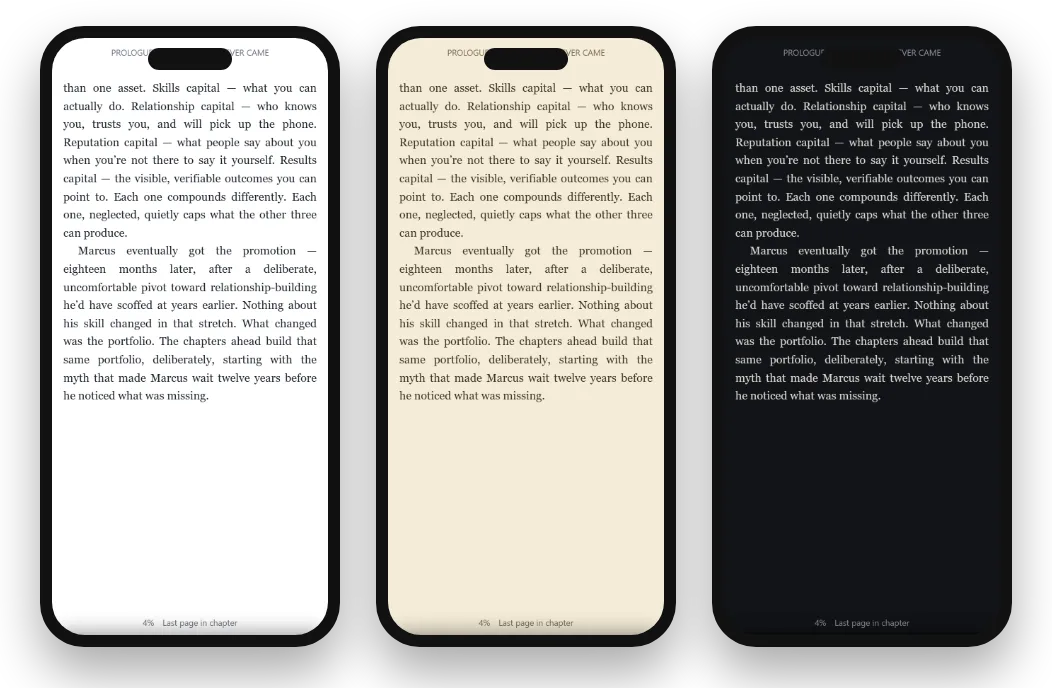
Light, sepia or dark: which to choose
| Theme | Looks like | Best for | Watch out for |
|---|---|---|---|
| Light | Black text on white | Daytime, bright rooms | Glare in a dark room |
| Sepia | Dark brown text on warm cream | Evenings, long sessions | Can feel dim in bright light |
| Dark | Light text on black or dark gray | Dark rooms, reading in bed | Some readers find long passages harder to read |
There's no single right answer. Many readers use Light by day, Sepia in the evening and Dark in bed with the lights off. An Auto setting that follows your device's light or dark mode takes care of the switch for you.
Why dark mode feels easier at night
In a dark room, a bright white screen is the brightest thing your eyes can see, which many people find uncomfortable. A dark theme gives off much less light overall, so it feels gentler and disturbs others less. The trade-off is that some people, especially those with astigmatism, find light text on a black background slightly blurry or tiring over long passages. If dark mode feels harsh, try sepia, or a dark gray background rather than pure black.
Brightness: the setting most people forget
Even the best theme is uncomfortable at full brightness. At night, turn brightness down until the screen is just comfortable to read in your room's light. Auto-brightness helps, but it often stays higher than you need at night, so adjust it by hand. A screen that roughly matches the brightness of its surroundings is usually the most comfortable.
Night filters and warm light
Most phones, tablets and computers have a night filter (sometimes called Night Shift, Night Light or Eye Comfort) that shifts the screen towards warmer colors in the evening. Many readers find this more comfortable after dark. Schedule it to switch on at sunset so you don't have to remember.
Screens and sleep
Bright light in the evening, including from screens, can make it harder for some people to feel sleepy. Reading itself is often relaxing; what matters is how you read. A dim screen, a warm filter, a dark or sepia theme and a calm book make a big difference compared with scrolling a bright feed. If you struggle to sleep, try stopping twenty or thirty minutes before bed, or switch to a print book for the last stretch.
Text size, fonts and spacing
- Go bigger at night. Tired eyes work harder on small text; one or two steps larger than your daytime size helps.
- Add line spacing. A little more space between lines makes it easier to keep your place.
- Choose a comfortable font. Many people find a serif font calmer for long reading; others prefer a clean sans-serif. Try both.
- Wider margins can make lines shorter and easier to follow on a tablet.
Recommended night settings
| Setting | Evening in a lit room | In bed, lights off |
|---|---|---|
| Theme | Sepia | Dark |
| Brightness | Low to medium | Lowest comfortable |
| Night filter | On | On |
| Text size | One step larger than daytime | Two steps larger |
| Line spacing | A little extra | A little extra |
A starting point; adjust to what feels comfortable for your eyes.
Eye strain: causes and simple fixes
| Cause | Fix |
|---|---|
| Staring without blinking | Blink deliberately; take short breaks |
| Small text | Increase text size and spacing |
| Glare | Lower brightness; switch to sepia or dark |
| Holding the screen too close | Hold it further away and enlarge the text |
| Long unbroken sessions | Look into the distance every twenty minutes or so |
If eye discomfort continues, or you notice headaches or blurred vision, have your eyes checked by an optician. Sometimes a small change in glasses makes screen reading far easier.
The twenty-twenty habit
A simple habit many eye-care professionals suggest for screen work: every twenty minutes or so, look at something far away for about twenty seconds. At night, glance across the room or out of the window between chapters. It relaxes the muscles that focus your eyes and reminds you to blink, which we do less often when concentrating on a screen. It takes seconds and makes long evenings of reading far more comfortable.
Reading in bed
- Prop yourself up rather than holding the phone above your face; it's easier on your neck and arms.
- Use a dark theme and the lowest brightness so you don't disturb a partner.
- Turn off notifications for the night, so a message doesn't pull you out of the book.
- Choose a calmer book for bedtime; save the page-turning thriller for the weekend.
Phone, tablet, laptop or e-reader at night?
| Device | At night |
|---|---|
| Phone | Convenient in bed; use dark mode, low brightness and large text |
| Tablet | More text per page; heavier to hold lying down |
| Laptop | Fine at a desk; less comfortable in bed |
| E-ink e-reader | Gentle for long night reading with a warm front light |
More on choosing a device in do you need an e-reader?
A calming bedtime reading routine
- Set your night filter to come on automatically at sunset.
- Switch your reading app to Sepia or Dark and lower brightness.
- Silence notifications and put other apps out of reach.
- Read something calm for fifteen to thirty minutes.
- Stop a little before sleep, and let your eyes rest in the dark.
Glasses, astigmatism and screen reading
If you wear glasses, make sure your prescription suits the distance at which you usually hold your screen; reading glasses tuned for print held close may not be ideal for a tablet at arm's length. People with astigmatism sometimes find that light text on a black background appears to glow or blur. If that's you, sepia or a dark gray background with off-white text is often more comfortable than pure black. An optician can advise on lenses for screen use.
Children and night reading
For children reading on screens at night, the same principles apply, with a little more care. Use a warm, dim screen, a comfortable text size and a set stopping time, and keep devices out of the bedroom once reading is done. Many families keep bedtime reading to print books or read an ebook together, then switch the screen off for the night.
Reading beside a sleeping partner
A white screen lights up a whole bedroom; a dark theme at low brightness barely shows. Turn the screen slightly away from your partner, silence every sound, and use gestures rather than taps if your reading app supports swiping to turn pages. Many couples find that a dark-themed ebook causes less disturbance than a bedside lamp.
Books that suit night reading
Some books are made for the end of the day: short devotionals, poetry, gentle essays, and history you can read a chapter at a time. A daily devotional or a book of reflections gives you a natural stopping point, which helps you put the screen down. See our guides to 30-day devotionals and hymn devotionals.
Night reading in Oasis Reader
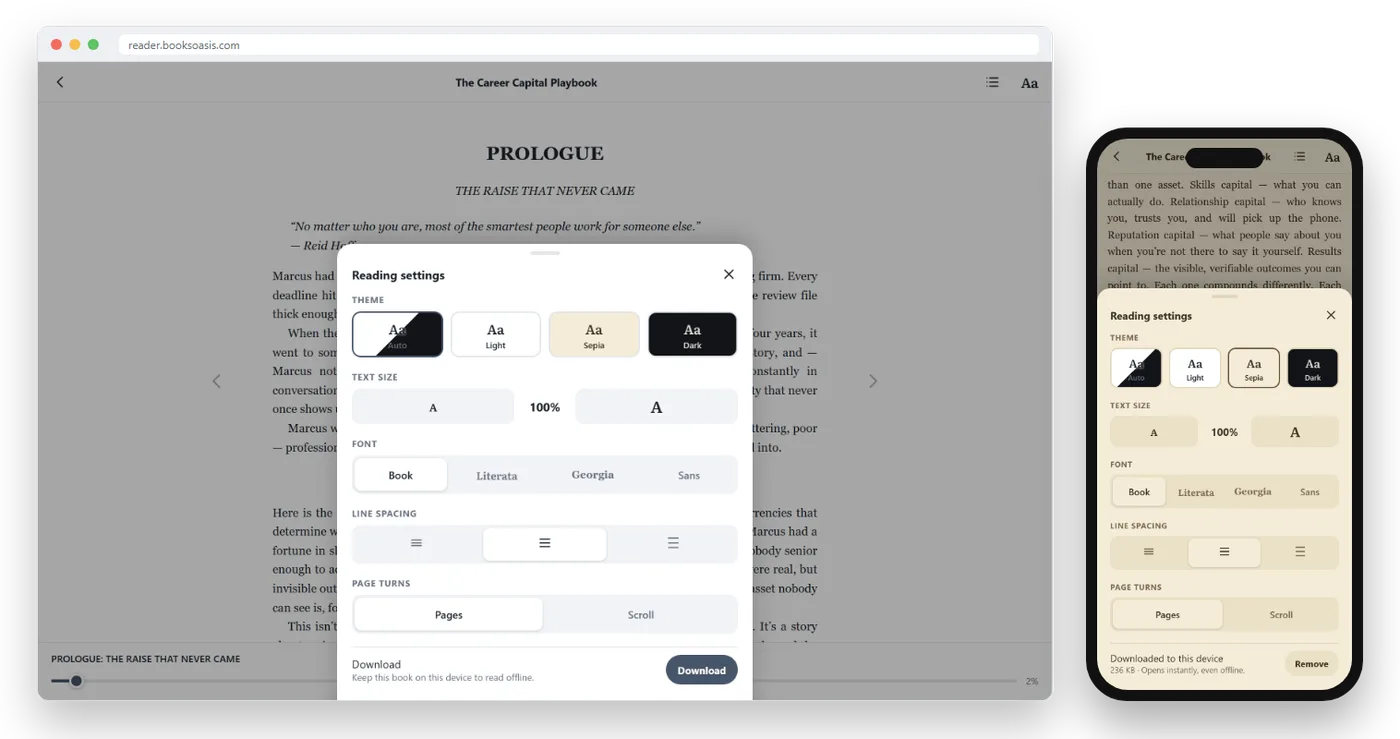
BooksOasis ebooks open in Oasis Reader, in any browser on your phone, tablet or computer. Its reading settings are built for comfortable reading at any hour:
- Light, Sepia and Dark themes, plus Auto, which follows your device's light or dark setting.
- Adjustable text size, font and line spacing.
- Highlights and notes for the lines you want to return to in the morning.
- Your place follows you between devices, so you can pick up on your phone in bed where you left off on your laptop.
What BooksOasis does not do
- It doesn't send books to e-ink e-readers; Oasis Reader works on phones, tablets and computers.
- It can't change your device's own night filter or brightness; set those in your device settings.
Three readers, three setups
A night-shift nurse reads in Dark mode on her phone during quiet hours, with brightness at its lowest and text two steps larger than usual.
A retired teacher prefers Sepia on a tablet in the evening, with a serif font and generous line spacing, and finds it as restful as a paperback.
A student set his reading app to Auto so it switches to Dark with his phone's night mode, and stops reading thirty minutes before bed.
Books to read tonight
In short
For comfortable night reading, use a dark or sepia theme, turn brightness down, switch on a warm night filter, enlarge the text, rest your eyes often, and stop a little before sleep. Small changes to your settings can turn screen reading into the calmest part of your evening.
Questions
Is dark mode better for reading at night?
Many people find dark mode more comfortable in a dark room because the screen gives off less light overall. Others find light text on black harder to read for long periods and prefer sepia. Try both and choose what feels easiest.
What is sepia mode?
A warm, cream-colored background with dark brown text, similar to an old paperback. It's softer than bright white and easier for many people than pure black.
Does screen light affect sleep?
Bright light in the evening, including from screens, can make it harder for some people to fall asleep. Dimming your screen, using a warm night filter and stopping a little before bed can help.
What text size should I use at night?
Larger than you'd use in daylight. Tired eyes appreciate bigger text and extra line spacing.
Should I use my phone's night mode?
Many readers find a warm night filter comfortable in the evening. Combine it with low brightness and a dark or sepia reading theme.
How far should I hold my phone?
A comfortable distance, typically around arm's length for a phone rather than close to your face, with the screen roughly at or slightly below eye level.
Why do my eyes feel tired after reading on a screen?
We tend to blink less when concentrating on screens, and bright or small text adds strain. Take short breaks, look into the distance, and enlarge the text.
Is an e-reader better at night than a phone?
E-ink screens with a front light can be gentler for long night reading. A phone set up with dark or sepia mode, low brightness and large text works well for many readers too.
Does Oasis Reader have dark mode?
Yes. Oasis Reader offers Light, Sepia and Dark themes, plus Auto, which follows your device's light or dark setting. Text size, font and spacing are adjustable.
How can I read in bed without disturbing a partner?
Use dark mode, the lowest comfortable brightness, and turn the screen slightly away. A dark theme gives off far less light than a white page or a lamp.
Is dark mode good for people with astigmatism?
Some people with astigmatism find light text on pure black looks blurry or seems to glow. Sepia, or off-white text on dark gray, is often more comfortable.
How often should I rest my eyes when reading on a screen?
A common habit is to look at something far away for about twenty seconds every twenty minutes or so, and to blink deliberately.
Read comfortably tonight
Light, Sepia and Dark themes, adjustable text and spacing in Oasis Reader.