Offline reading is one of the best things about ebooks: a whole library that needs no Wi-Fi. It only goes wrong when you forget to download before you leave. This guide explains how offline reading works, how to do it in the main apps, and how to avoid the classic travel mistakes.
How offline reading works
When you buy an ebook, it is added to your library in your account. That library lives online, which is why you can see it on any device you sign in to.
To read without a connection, the book's content has to be saved onto the device you are holding. That is what "download" means in a reading app. Once saved, the app opens the book from the device itself, not the internet.
Two things follow from that:
- Downloads are per device. Downloading on your phone doesn't download it on your tablet.
- Your library is still online. Removing a download frees space but never removes the book from your library.
Offline reading in the main apps
| App | Offline reading | How to download |
|---|---|---|
| Kindle | Yes | Tap a book's cover in your library to download it; it shows as downloaded once saved |
| Kobo | Yes | Books download when you open them, or use the download option in your library |
| Apple Books | Yes | Tap the download (cloud) icon on the book |
| Google Play Books | Yes | Use the book's menu and choose Download |
| Libby | Yes, for loans | Borrowed books download to the app until the loan ends |
| Oasis Reader | Yes | Automatic: every book you own downloads when you open the app online |
Exact buttons change with app updates; look for a download or cloud icon if the wording differs.
How Oasis Reader keeps your books offline
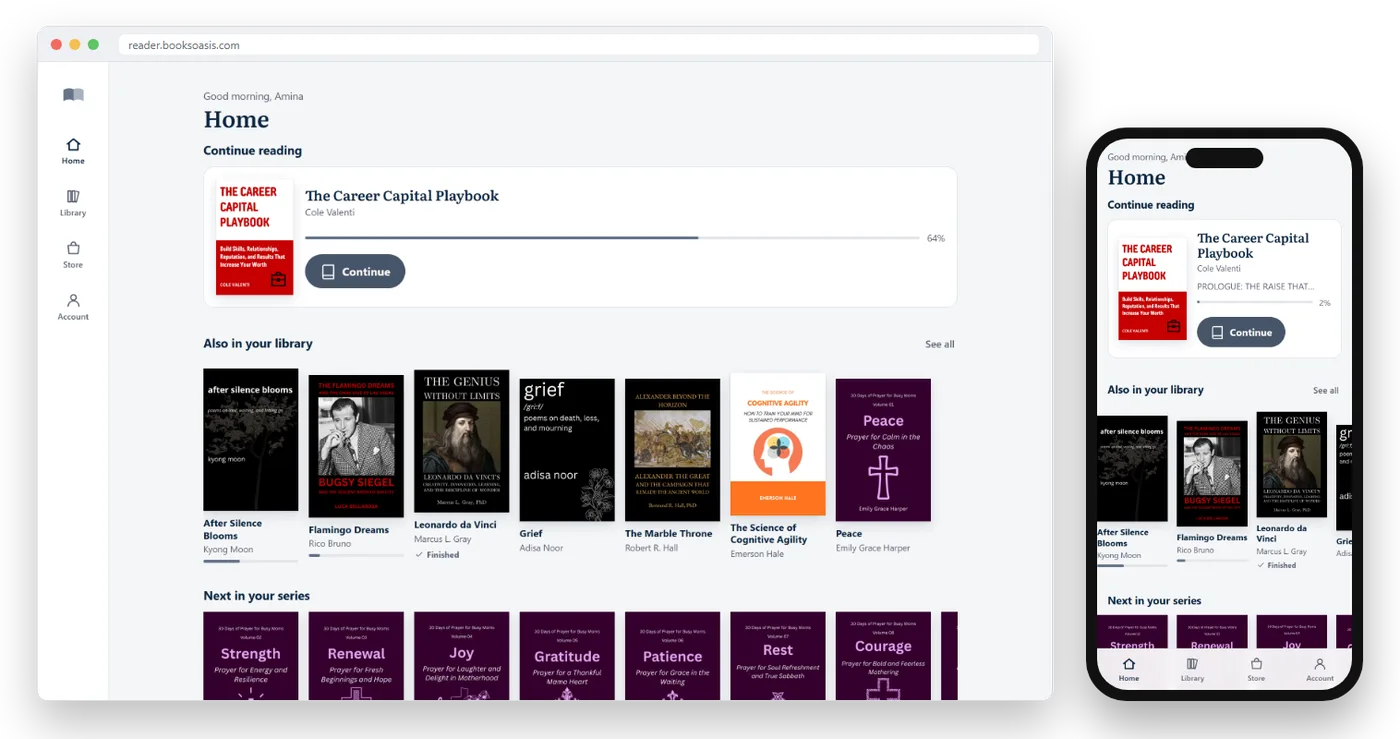
Oasis Reader takes the download step away. Every ebook you own is saved to the device automatically, so there's nothing to remember before a trip.
- Open Oasis Reader once while online on each phone, tablet or computer you read on.
- Your books download by themselves, one after another, in the background. New purchases follow as soon as they reach your library.
- Read anywhere. With no connection, the app opens from the device and shows the books it holds.
Your notes and place while offline
A common worry is losing highlights made on a plane. In apps that sync, you won't.
In Oasis Reader, anything you highlight or note while offline is saved on your device first, then added to your account as soon as you are back online. Your reading position syncs the same way, so when you pick up your tablet later, you carry on from where you stopped on your phone.
Before you travel: a checklist
| Do this | Why |
|---|---|
| Download your current book | So it opens without a signal |
| Download the next one or two books too | You may finish sooner than you expect |
| Open each download once | Confirms it really saved before you lose Wi-Fi |
| Download on each device you are taking | Downloads don't copy between devices |
| Charge your devices and pack a charger | Offline reading still needs battery |
| Borrow library books early | Libby loans need to download before you leave |
Where offline reading helps most
Flights
Airplane mode and in-flight Wi-Fi prices make downloads essential. Download two books per long flight; delays happen.
Commutes
Underground trains and rural routes drop signal constantly. A downloaded book never stalls between stations.
Holidays and remote places
Cabins, beaches and mountain villages often have weak or no coverage. A few downloaded books cover a whole week.
Saving mobile data
Downloading at home on Wi-Fi means reading on the move uses no mobile data at all.
Hospitals and waiting rooms
Signal is often poor in large buildings. A downloaded book is a calm companion during long waits.
Offline reading on each kind of device
iPhone and iPad
Store apps like Kindle, Kobo and Apple Books download books inside the app. For Oasis Reader, open reader.booksoasis.com in Safari, add it to your Home Screen, and open it from there once while online, so your books download into its own app space. Books saved in a Safari tab stay with Safari, and books saved in the Home Screen app stay with the app.
Keep a little free storage on the device. When an iPhone runs very low on space, it can clear data that apps and websites have saved.
Android phones and tablets
Store apps download inside the app as usual. For Oasis Reader, install the Android app (download it from reader.booksoasis.com) or choose Install app in Chrome, then open it once while online so your books download to it.
Windows and Mac laptops
Kindle and Kobo have desktop apps that download books. Oasis Reader downloads through your browser, and on a Windows laptop the Oasis Reader app from the Microsoft Store keeps everything in its own window.
Chromebooks
Chromebooks are made for the browser, so Oasis Reader feels at home. Install it from Chrome's address bar, open it once while online, and your books are ready for reading on the train or anywhere without Wi-Fi.
Planning your books for a long trip
Running out of book halfway through a holiday is a real risk with fast readers. A little planning avoids it.
- Estimate your pace. If you read a book a week at home, you may read two or three on a relaxing holiday.
- Mix lengths and moods. Pack one long book, one quick read and one comfort read.
- Consider a series. A downloaded series means you never need to choose the next book with no signal.
- Buy before you go. Airport and hotel Wi-Fi is unreliable; buy and download your holiday books the night before.
- Include something for others. On a shared tablet, download a book for your travel companion too.
Making your battery last
Offline reading is easy on data, but screens still use battery. On long days away from a charger:
- Use the Dark theme on phones with OLED screens, which can save power.
- Turn brightness down to the lowest comfortable level.
- Switch on airplane mode or low power mode while reading; the downloaded book doesn't need a connection.
- Close other apps running in the background.
- Carry a small power bank on long travel days.
How much space do ebooks take?
Less than most people expect. Text compresses extremely well, so a full novel is typically a few megabytes, smaller than a handful of photos.
| Type of book | Typical size |
|---|---|
| Novel or non-fiction, mostly text | A few megabytes |
| Book with some photos or maps | Somewhat larger |
| Heavily illustrated book | Can be tens of megabytes |
Because ebooks are small, keeping a whole library on a phone usually takes less space than a few photos or a single app.
Troubleshooting offline reading
| Problem | Likely cause | Fix |
|---|---|---|
| The book won't open offline | It wasn't downloaded on this device | Reconnect and download it on this device (in Oasis Reader, just open the app online) |
| It downloaded on my phone but not my tablet | Downloads are per device | Download it on the tablet too |
| My highlights are missing on another device | That device hasn't synced yet | Open the book online on both devices |
| The download disappeared | The browser or phone cleared storage to free space | Download again, and keep some free space on the device |
| Library book won't open | The loan ended | Borrow it again or place a hold |
A note on browser storage
Oasis Reader runs in your browser, and downloaded books are stored by the browser on that device. Browsers are careful with storage, which is good for privacy, but it means two things are worth knowing:
- Private or incognito windows don't keep downloads after you close them. Use a normal window for books you want offline.
- Clearing site data in your browser settings removes downloads for that site. Your library is untouched; just download again.
Installing the Oasis Reader Android app, or adding Oasis Reader to your home screen on iPhone, gives it its own space on your phone, which is the best way to keep downloads handy.
Offline reading for families and shared devices
If several people read on one tablet, or a child reads on a parent's phone, a few habits keep things simple:
- Each reader signs in with their own account, so their books, place and notes stay separate.
- Download books for the person who will be reading offline before the trip.
- Remove finished downloads afterwards to keep storage free for the next journey.
Because your library lives in your account, signing in on a new or borrowed device brings everything back. You only need to download again for offline use.
Offline reading vs owning a file
Downloading a book for offline reading is not the same as owning a copy of the file. Most stores, including BooksOasis, keep books inside their own reading app, protected so they can't be copied and shared. You can read them offline as much as you like, on your own devices, but you can't move them to another app.
That protection is how independent authors keep earning from their work. For readers, it means one less thing to manage: no files to back up, and your library is always there when you sign in.
Offline reading with BooksOasis
- Every ebook you own downloads automatically to each device you open Oasis Reader on.
- Highlights and notes made offline sync when you reconnect.
- Works on phones, tablets and computers, and from your home screen like an app.
Good to know: books are read inside Oasis Reader, not downloaded as files, and they don't open on Kindle or Kobo e-readers.
Find a book for your tripGood books for a journey
Long reads for long journeys.
In short
Offline reading is simple once you know the rule: download while you are online, on each device, before you need it. Do that, add a book or two extra for long trips, and a dead signal will never interrupt a good chapter again. For more comfort tips, see how to read ebooks on your phone comfortably.
Questions
Can I read ebooks without internet?
Yes. Download the book to your device while you are online, and it will open with no connection. Most reading apps, including Oasis Reader, support offline downloads.
Do downloaded ebooks take up much space?
Usually very little. A typical novel is a few megabytes. Books with many images or illustrations are larger.
Do my highlights sync if I read offline?
In apps that support it, yes. Oasis Reader saves highlights and notes made offline on your device and adds them to your account when you reconnect.
Do I need to download a book on every device?
In most apps, yes: downloads belong to the device you make them on. Oasis Reader does it for you: open the app once while online on each phone, tablet or computer, and every book you own downloads to it automatically.
Can I read library ebooks offline?
Yes. Libby lets you download borrowed ebooks for offline reading until the loan ends.
What happens if I remove a download?
The book stays in your library. You can download it again any time you are online.
Can I read offline on a plane in airplane mode?
Yes. As long as the book was downloaded before you switched on airplane mode, it opens and reads normally. Your highlights are saved on the device and sync after you land.
Why did my downloaded book disappear?
A phone or browser may clear saved data when storage runs very low, or when site data is cleared in settings. The book is still in your library; reconnect and download it again.
Take a book on your next trip
Buy an ebook and Oasis Reader keeps it on your device, ready with no signal at all.