Laptops are rarely anyone's first choice for reading novels, but they are brilliant for some kinds of reading: study, work, reference books, and anything you want to take notes on. They are also the only screen many people have at lunch or during a break. This guide covers the options for Windows, Mac and Chromebook.
Your options at a glance
| Reader | Windows | Mac | Chromebook | Install needed |
|---|---|---|---|---|
| Oasis Reader (BooksOasis) | Yes (Windows app or browser) | Yes (browser) | Yes (browser) | No; optional Windows app |
| Kindle for web | Yes | Yes | Yes | No |
| Kindle desktop app | Yes | Yes | No | Yes |
| Kobo desktop app | Yes | Yes | No | Yes |
| Apple Books | No | Yes | No | Built in |
| Google Play Books | Yes (web) | Yes (web) | Yes | No |
| Caliber (your own DRM-free files) | Yes | Yes | No | Yes |
Availability as generally offered at the time of writing.
Browser readers: the simplest option
A browser reader opens your book in a web page. There is nothing to install, it works on work computers where you can't add software, and it works the same on Windows, Mac, Linux and ChromeOS.
Oasis Reader, the reading app for BooksOasis ebooks, runs this way at reader.booksoasis.com. Sign in with your BooksOasis account and your library is there.
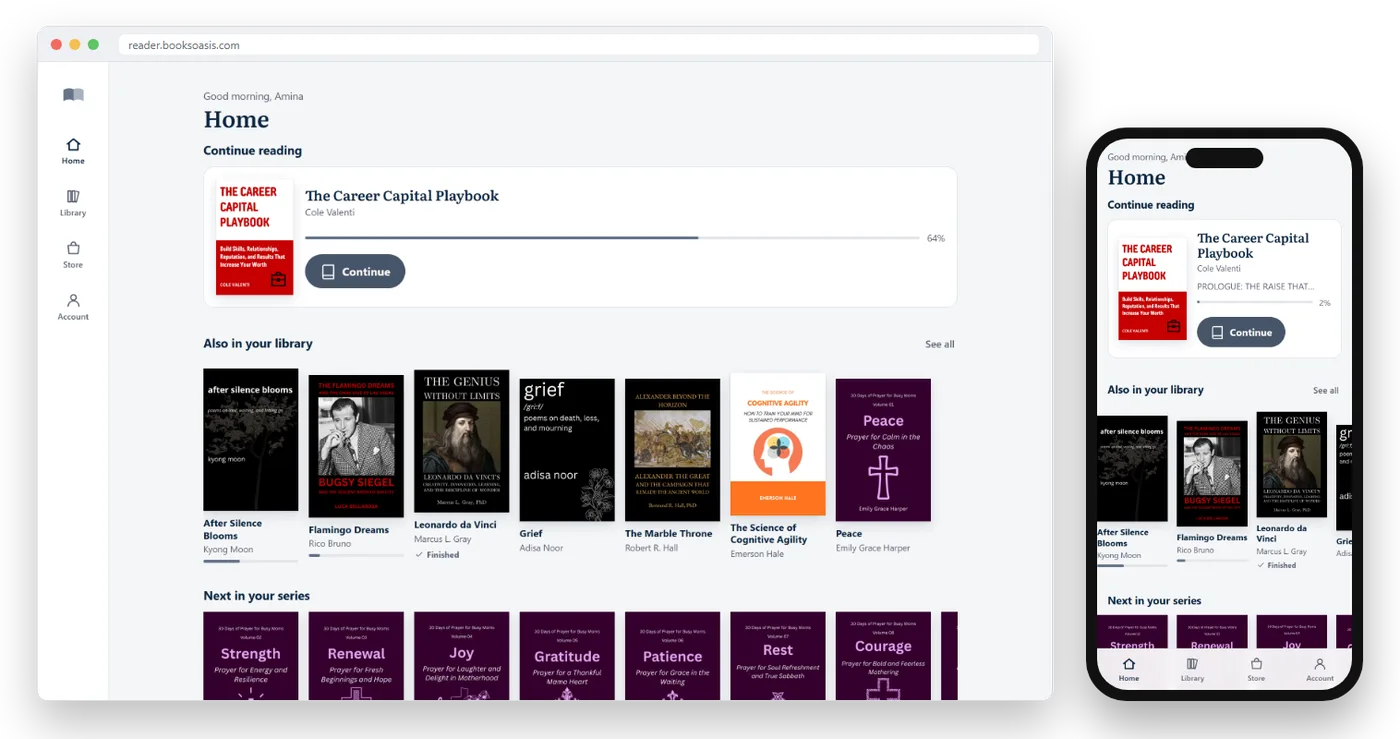
On a Windows laptop, you can also get the Oasis Reader app from the Microsoft Store, so it opens in its own window like any program and sits in the Start menu.
Desktop apps
Kindle and Kobo both offer desktop apps for Windows and Mac. They download your books to the computer and work offline. Apple Books is built into every Mac and syncs with iPhone and iPad.
Desktop apps can feel more like a traditional program, with your library in a window. The trade-off is installing and updating software, which isn't always possible on a work or school computer.
Reading on a Chromebook
Chromebooks are built around the browser, so browser readers work perfectly. Many Chromebooks can also run Android apps from the Google Play Store, including Kindle, Kobo and Google Play Books, though the experience varies by model.
For BooksOasis ebooks, open reader.booksoasis.com in Chrome and install it from the address bar for an app-like window.
Making laptop reading comfortable
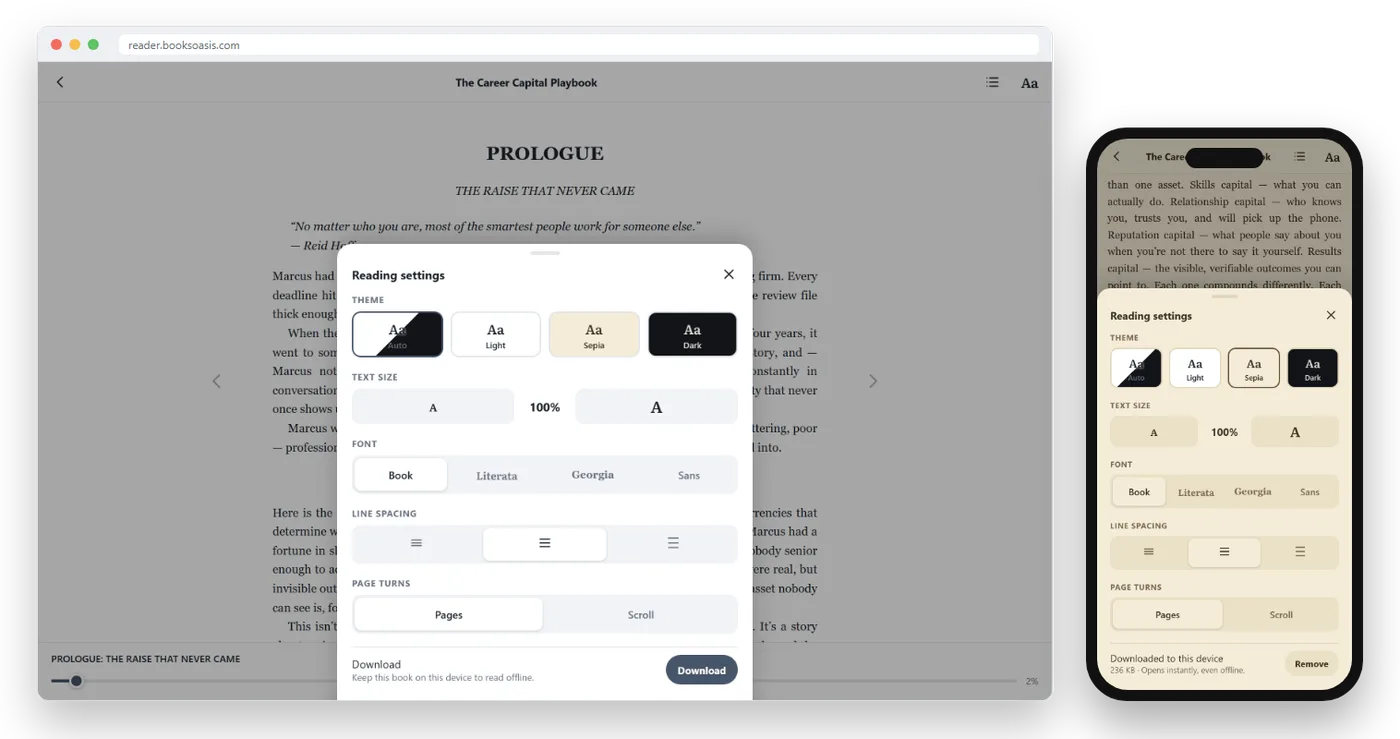
- Use a warm or dark theme. A bright white page on a big screen is tiring. Sepia or Dark is much kinder.
- Increase text size. Laptops sit further away than phones; bigger text avoids leaning in.
- Narrow the page. Long lines across a wide screen are hard to follow. Use a reader that keeps the text column comfortable, or shrink the window.
- Try scroll mode. On a laptop, scrolling through a chapter with a trackpad can feel more natural than page turns.
- Use the keyboard. In Oasis Reader, the left and right arrow keys turn pages.
- Sit well. Screen at arm's length, top of the screen at or slightly below eye level.
Where laptops shine: notes and study
The laptop's real advantage is working alongside your book. Keep the ebook in one window and your notes, document or spreadsheet in another.
- Highlight key passages in colors that mean something to you, such as yellow for ideas and green for quotes.
- Add notes to highlights as you read.
- Search inside the book to find every mention of a name or term.
- Copy short passages for your notes, where the reader allows.
- Review all highlights in one list at the end of a chapter.
See highlights and notes: remember what you read.
Split screen: book on one side, notes on the other
Most laptops can place two windows side by side. On Windows, drag a window to the left or right edge of the screen, or press the Windows key with the left or right arrow. On a Mac, hover over the green button at the top of a window and choose to tile it left or right. On a Chromebook, press Alt with the left or right square bracket keys. Put your book on one side and your notes on the other.
Accessibility on a computer
Computers offer some of the best accessibility tools for reading:
- Zoom: enlarge the whole screen or just the browser (Ctrl or Cmd with the plus key).
- Screen readers: Windows Narrator, VoiceOver on Mac and ChromeVox on Chromebooks can read text aloud.
- High contrast: combine a Dark theme with your system's high-contrast settings.
- Keyboard control: turn pages and navigate without a mouse.
PDFs and textbooks
Fixed-layout PDFs and textbooks are much easier on a laptop than a phone, because a whole page fits the screen. Reflowable ebooks, like novels and most non-fiction, adapt to any screen, so they read well everywhere. If you study from both, a laptop is the one device that handles them all comfortably.
Set up laptop reading in five minutes
- Open your readerin the browser, or install the desktop app.
- Choose Sepia or Darkand raise the text size one or two steps.
- Pick scroll or page turns, whichever feels more natural with a trackpad.
- Install it as an appfrom Chrome or Edge, if you use a browser reader, so it has its own window.
- Download your current bookfor offline reading on trains and planes.
Battery and power
Reading uses little power compared with video or games, but a bright screen still drains a laptop. Lower the brightness, use a Dark theme on laptops with OLED screens, and close heavy background apps for a longer session away from a charger.
Reading at work or on shared computers
If you read on a work or library computer, a browser reader is ideal: sign in, read, and sign out when you are done, with nothing left installed. Avoid saving your password on shared machines, and use a private window if you prefer. Remember that private windows don't keep offline downloads.
Offline reading on a laptop
Desktop apps download books to the computer automatically. In Oasis Reader, open a book, select Aa for Reading settings, then Download to keep it on that computer for offline reading. Downloads belong to the device, so download separately on each computer you use. See how to read ebooks offline.
Building a reading habit at your desk
If you spend your day at a computer, your laptop can be a quiet reading place too. Block ten minutes after lunch, close your email, open your book full screen and read one chapter. Browser readers make this effortless: bookmark your reader, and your book is always one click away, exactly where you stopped on your phone last night.
Some readers keep a "reading tab" pinned in their browser, so the book is waiting whenever a meeting ends early.
Common laptop reading problems
| Problem | Fix |
|---|---|
| Lines too long to follow | Shrink the window or use a narrower reading layout |
| Eyes tired after a chapter | Sepia or Dark theme, larger text, lower brightness |
| Book not available offline | Download it on this computer while online |
| Place not synced from your phone | Make sure both devices were online after you last read |
| Can't install apps on a work computer | Use a browser reader instead |
Laptop, tablet or phone?
| You are reading... | Best screen |
|---|---|
| A novel in spare moments | Phone |
| A novel in the evening | Tablet or e-reader |
| Non-fiction you want to study | Laptop |
| A book for a class or work project | Laptop |
| An illustrated book or PDF | Tablet or laptop |
With a reader that syncs, you don't have to choose: read on your laptop at lunch and continue on your phone on the way home.
Three ways people use laptop reading
The lunchtime reader
Reads a chapter at their desk each day in a browser tab, then continues on their phone on the commute.
The student
Keeps a history book open beside an essay, highlighting quotes and searching for names while writing.
The book club member
Reviews all their highlights and notes on the laptop before each meeting.
Reading on your laptop with BooksOasis
- Oasis Reader runs in any modern browser on Windows, Mac, Linux and ChromeOS.
- Highlights, notes, search and themes, synced with your phone and tablet.
- Install it as an app from Chrome or Edge, and download books for offline reading.
Good to know: BooksOasis ebooks are read inside Oasis Reader, not downloaded as files, and don't open on Kindle or Kobo e-readers.
Browse ebooksNon-fiction worth reading on a big screen
Non-fiction made for a big screen and a notebook.
In short
Reading on a laptop is easy: open a browser reader or install a desktop app, choose a comfortable theme and text size, and use the big screen for what it does best, working with the book beside your notes. With syncing, your laptop becomes one more place to pick up where you left off.
Questions
Can I read Kindle books on a laptop?
Yes, through the Kindle desktop app or Kindle for web in a browser.
Can I read Kobo books on a computer?
Kobo offers desktop apps for Windows and Mac, but no web reader in the browser.
What is the best way to read ebooks on a Chromebook?
A browser-based reader, such as Oasis Reader or Kindle for web, or Android reading apps from the Google Play Store on Chromebooks that support them.
Can I read BooksOasis ebooks on my laptop?
Yes. Oasis Reader runs in any modern browser on Windows, Mac, Linux and ChromeOS. On Windows, you can also get the Oasis Reader app from the Microsoft Store.
Is reading on a laptop bad for your eyes?
Not if you set it up well: larger text, a sepia or dark theme, a comfortable distance and regular breaks.
Can I read ebooks on a Windows PC?
Yes. Use a browser reader such as Oasis Reader, Kindle for web or Google Play Books, or install the Kindle or Kobo desktop apps.
Does Apple Books work on Windows?
No. Apple Books runs on Mac, iPhone and iPad only.
Do my highlights sync from laptop to phone?
In readers that sync, yes. Oasis Reader saves your place, highlights and notes to your account, so they appear on your phone and tablet too.
Can I print pages from an ebook?
Most reading apps don't allow printing protected ebooks. For notes, use highlights and short copied passages where the reader allows it.
Which browser works best for Oasis Reader?
Any up-to-date browser, such as Chrome, Edge, Safari or Firefox. On Windows, there is also an Oasis Reader app in the Microsoft Store.
Can I read on a laptop without internet?
Yes, if you download the book first. Desktop apps usually store books automatically; Oasis Reader saves every book you own to the laptop automatically the first time you open it online.
Is a laptop good for reading novels?
It works well for a chapter at a desk or on a train table, especially with a Dark or Sepia theme. For long, relaxed reading sessions many people prefer a phone, tablet or e-reader.
How do I turn pages with the keyboard?
In Oasis Reader, use the left and right arrow keys. Most desktop reading apps support arrow keys or the Page Up and Page Down keys.
Can I use a second monitor for reading?
Yes. Put your book on one screen and your work or notes on the other; a portrait-oriented monitor is especially comfortable for reading.
Can I read on a laptop and a phone at the same time?
Yes. Your place syncs when each device is online, so you can switch from one to the other and carry on where you stopped.
Read in your browser, right now
Buy an ebook and open it in Oasis Reader on your laptop in seconds.