Amazon's Kindle store is huge, convenient and often cheap. It is also the reason many readers now feel boxed in. This guide compares the main alternatives honestly, including what each one can't do, so you can choose with your eyes open.
Why readers look for a Kindle alternative
Most people don't leave Kindle because it is bad. They leave because of one of four frustrations.
1. Your books are locked to Amazon
Kindle books are licensed to your Amazon account. They open on Kindle devices and in Kindle apps, and nowhere else.
In February 2025 Amazon also removed the "Download & Transfer via USB" option, which many readers used to keep their own backup copies (Good e-Reader). Books now arrive over Wi-Fi only. For some readers that was the moment they started spreading their purchases around.
2. The subscription adds up
Kindle Unlimited costs $11.99 a month in the US at the time of writing (Engadget, June 2026). That is about $144 a year.
If you read two or three books a month from its catalog, it can be good value. If you read one book a month, or the books you want aren't in it, you may pay more than buying books one at a time.
3. You want to support authors differently
Many readers want more of their money to reach the people who wrote and published the book. Where you buy makes a real difference to how much of the price reaches them.
4. You just want choice
One store deciding what you see, what it costs and where you can read it is a lot of power. Plenty of readers simply prefer to keep a second or third place to buy books.
What to look for in an alternative
Before comparing stores, decide which of these matter most to you. It will make the choice obvious.
| What you care about | Question to ask | Why it matters |
|---|---|---|
| Devices | Will it open on the phone, tablet, computer or e-reader I already have? | A new device is the biggest hidden cost of switching. |
| Catalog | Does it sell the kinds of books I actually read? | A huge store is useless if your genres are thin there. |
| Price | Is it cheaper per book, or only through a subscription? | Subscriptions suit heavy readers; per-book buying suits everyone else. |
| Offline reading | Can I download books to read without a connection? | Travel, commutes and patchy Wi-Fi. |
| Notes and sync | Do highlights and my place follow me between devices? | Essential if you read on a phone and a laptop. |
| Who gets paid | How much of the price reaches the author and publisher? | The reason many readers switch in the first place. |
The main Kindle alternatives compared
Here is how the six most common alternatives stack up on the points above. Prices and features change, so check each store before you commit.
| Store or app | Reads on | Best for | Watch out for |
|---|---|---|---|
| Kobo | Kobo e-readers, Android, iPhone, iPad | E-ink reading, library borrowing on Kobo devices | No reading in a web browser |
| Apple Books | iPhone, iPad, Mac | People who live in Apple's world | No Android or Windows app |
| Google Play Books | Android, iPhone, web | Android users; uploading your own EPUB and PDF files | Discovery can feel like a search engine, not a bookshop |
| Nook (Barnes & Noble) | Nook devices, Android, iPhone | US readers who like B&N | Mostly aimed at US customers |
| Libby | Android, iPhone, web, some Kindles in the US | Free borrowing with a library card | Waiting lists for popular books |
| BooksOasis | Any phone, tablet or computer, in the browser or as an installed app | Independent publishers' books, daily deals, series discounts | Doesn't open on Kindle or Kobo e-ink readers |
Kobo: the closest thing to a Kindle
If you love reading on e-ink, Kobo is the natural first stop. Rakuten Kobo makes its own e-readers, runs a large ebook store, and has apps for Android and Apple devices.
Kobo devices can also borrow library ebooks through OverDrive, which is a real advantage if your library supports it.
Kobo Plus is its subscription, listed at $7.99 a month for ebooks or $9.99 with audiobooks in the US (Kobo). Like Kindle Unlimited, it covers part of the catalog, not everything.
Choose Kobo if you want a dedicated e-reader and a big mainstream store. Read our Kobo alternatives guide if you are already on Kobo and want options.
Apple Books: easy if you are all-Apple
Apple Books comes built into every iPhone, iPad and Mac. It looks lovely, syncs smoothly and needs no setup.
The catch is simple: there is no Apple Books app for Android or Windows. If you ever switch phones, your library stays behind on Apple devices.
Choose Apple Books if every screen you own has an Apple logo and you expect it to stay that way.
Google Play Books: flexible and cross-platform
Google Play Books works on Android, iPhone and in a web browser. It also lets you upload your own EPUB and PDF files, which makes it a handy home for books you already have as files.
Its store is large. Browsing it can feel more like searching than wandering a bookshop, so it suits readers who already know what they want.
Choose Google Play Books if you use Android, or you want one app for bought books and your own files.
Nook: the Barnes & Noble option
Barnes & Noble's Nook store and devices are a long-standing Kindle rival in the US. The apps work on Android and Apple devices.
It is strongest for readers in the US who already shop at Barnes & Noble. Outside the US, the experience is more limited.
Libby: free books from your library
Libby, from OverDrive, lets you borrow ebooks and audiobooks free with a library card. It is one of the best-kept secrets in reading.
The trade-off is waiting. Popular new releases can have long hold lists, and loans expire. Libby is a wonderful companion to a store, not usually a full replacement.
BooksOasis: independent books on any screen
BooksOasis is an ebook-first bookstore that sells books directly from independent authors and publishers. You buy the book, and it is ready to read in Oasis Reader within seconds.
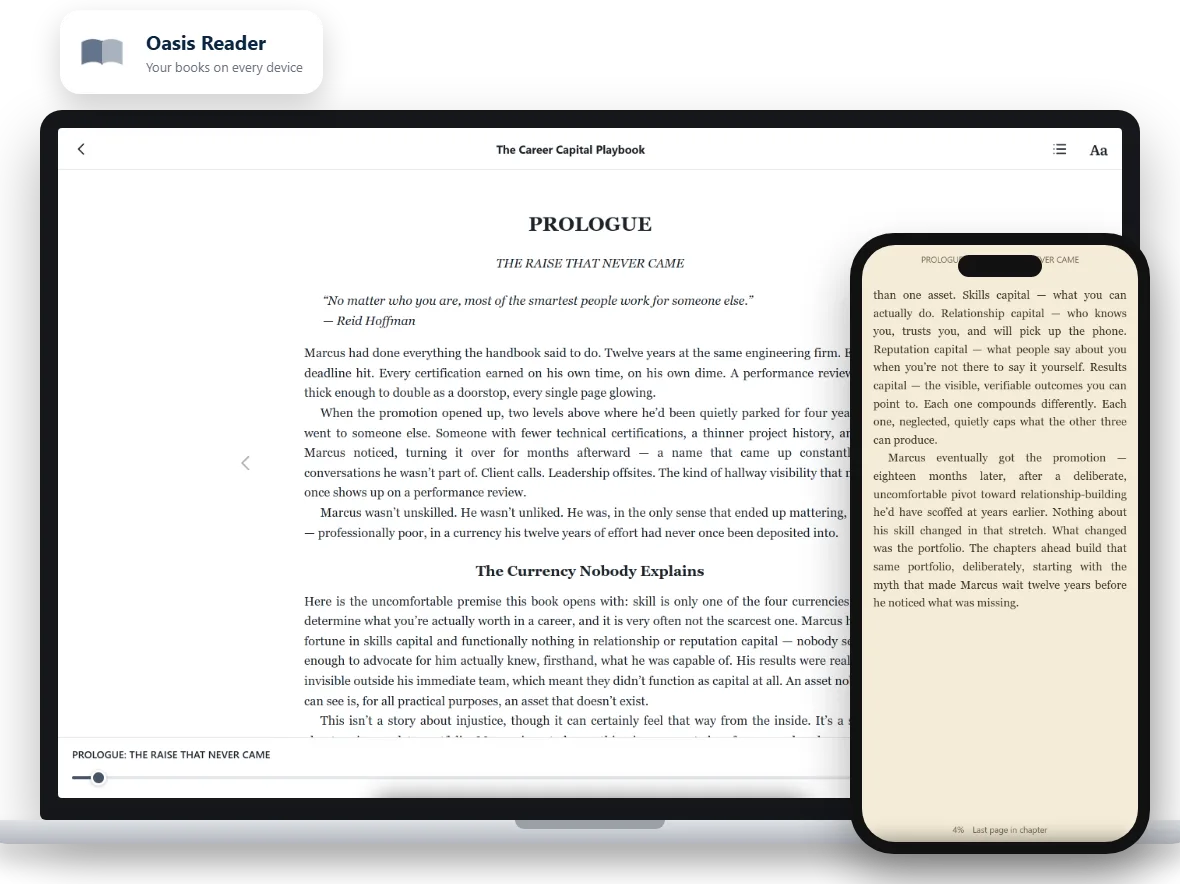
Oasis Reader runs in the browser you already use, and you can add it to your home screen so it opens like an app. Here is what it does:
- Offline reading: download a book once and read it with no connection.
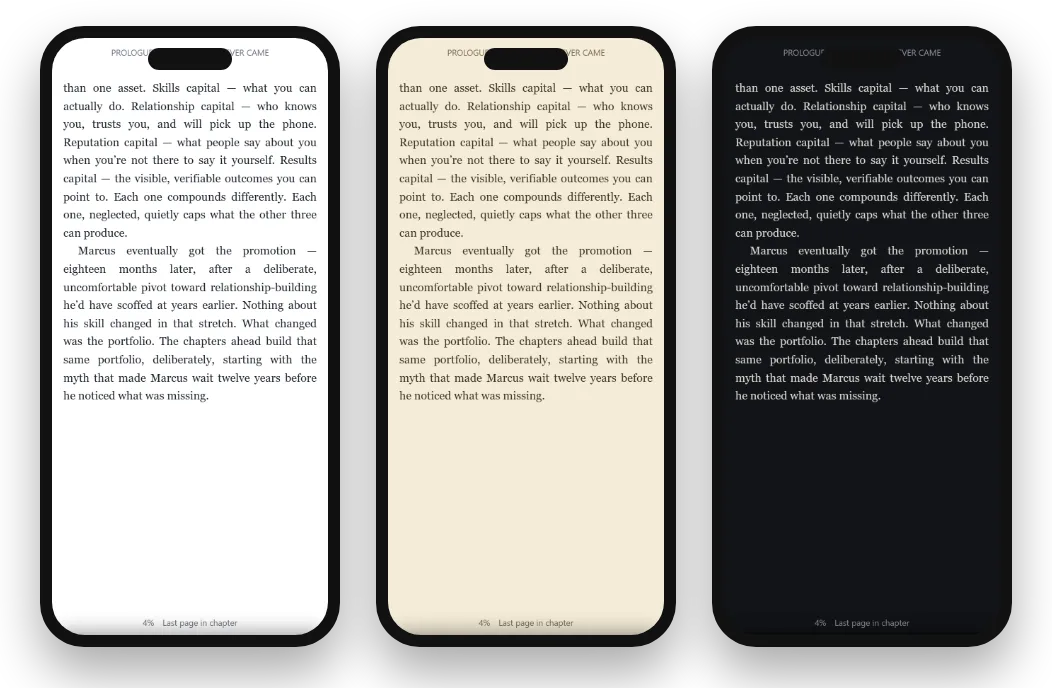
- Comfort settings: Light, Sepia and Dark themes, text size, fonts and line spacing.
- Highlights and notes: four colors, your own notes, and search inside the book.
- Sync: your place, highlights and notes follow you between devices.
On price, BooksOasis runs a Deal of the Day, Offers of the Week and a rotating series deal, where the first books in a series or the whole set are discounted together.
Where BooksOasis fits
- Books sold direct from independent publishers, who keep the full ebook price because they pay a flat plan instead of a commission.
- Instant reading on any phone, tablet or computer, online or offline.
- Daily and weekly offers, plus series and bundle discounts.
What it doesn't do: BooksOasis ebooks aren't downloaded as files and don't open on Kindle or Kobo e-ink readers. Its catalog is focused, not millions of titles.
See today's offersCan you take your Kindle library with you?
Honestly, no, not in any normal way. Kindle books are licensed to your Amazon account and protected so they open only in Kindle apps and devices.
That sounds worse than it is. You don't have to choose one store forever. The simplest approach is:
- Keep the Kindle app.Your existing books stay readable in the free Kindle app on your phone or computer.
- Buy new books elsewhere.Choose a second store for new purchases, based on the table above.
- Add Libby.Borrow free books from your library for anything you only want to read once.
- Judge after three months.Look at what you actually read and where. Most readers settle into one main store and one backup.
What a year of reading costs, three ways
A subscription feels cheap each month, and buying books feels expensive each time. The honest comparison is over a whole year.
The figures below use Kindle Unlimited's US price at the time of writing and a typical $9.99 ebook. Your own numbers will differ, so swap in the books you actually read.
| How you read | Books a year | Approximate yearly cost | You keep the books? |
|---|---|---|---|
| Kindle Unlimited | As many as you like from its catalog | $143.88 | No, they go when you cancel |
| Buying one book a month | 12 | $119.88 at $9.99 each, less with deals | Yes, in your library |
| Buying on offer only | 12 | About $66 to $90 at 25% to 45% off | Yes |
| Borrowing through Libby | As many as your library allows | $0 | No, loans expire |
Example figures for comparison only. Check current prices before deciding.
The pattern is clear. Heavy readers who love a subscription's catalog do well with one. Everyone else usually spends less, and keeps their books, by buying on offer and borrowing the rest.
Reading comfortably without an e-ink Kindle
The biggest worry about leaving Kindle is losing the e-ink screen. If you don't want another e-reader, a phone or tablet can be surprisingly comfortable once you set it up well.
- Use Sepia or Dark at night. A warm or dark page is far easier on tired eyes than bright white.
- Turn the text up one size. Most people read on phones with text that is too small, then blame the screen.
- Add more line spacing. A relaxed line height makes long reading sessions noticeably easier.
- Download before you travel. Save the book to your device so a dead signal never interrupts a chapter.
- Silence notifications. Focus mode or Do Not Disturb turns a phone back into a book.
For a fuller walk-through, see how to read ebooks on your phone comfortably and how to read ebooks offline.
Popular right now on BooksOasis
Readers’ favorites this week.
Which Kindle alternative should you choose?
Match the choice to your main frustration:
| If your main frustration is... | Try |
|---|---|
| You want a different e-ink reader | Kobo |
| You spend too much on books | Libby for borrowing, plus daily deals at BooksOasis |
| Kindle Unlimited isn't worth it any more | Pay per book, and see our Kindle Unlimited alternatives |
| You read mostly on your phone | Google Play Books, Apple Books or BooksOasis |
| You want more money to reach authors | BooksOasis, and buying direct wherever you can |
There is no rule that says you need only one. Most happy readers use two: a main store for new books, and a library app for everything else.
Questions
Can I move my Kindle books to another app?
Not in a normal way. Kindle books are tied to your Amazon account and to Kindle devices and apps. Keep the free Kindle app for the books you already own, and buy new books wherever suits you.
Is there a free Kindle alternative?
Yes. Libby lets you borrow ebooks free with a library card, and many stores offer free public-domain classics. For new releases and independent books you will usually pay per book.
Do I need to buy a new device to leave Kindle?
No. Every alternative in this guide works on a phone or tablet, and most work on a computer. Only Kobo and Nook sell their own e-ink readers.
Can I read BooksOasis ebooks on a Kindle device?
No. BooksOasis ebooks open in Oasis Reader, which runs on phones, tablets and computers. They don't open on Kindle or Kobo e-ink readers.
Which Kindle alternative is cheapest?
Borrowing through Libby is free. For buying, compare the price of each book, and watch for daily deals and series discounts rather than choosing a store by its subscription.
Start a library you can read anywhere
Buy an ebook today and read it in seconds on your phone, tablet or computer.