Google Play Books is one of the most flexible reading apps around. It runs on Android, iPhone and in a browser, it lets you upload up to 2,000 of your own EPUB and PDF files, and it comes with most Android phones. For many readers it is simply the default.
Still, a default isn't always the best fit. This guide covers why readers look elsewhere, how the main alternatives compare, and what happens to your purchases and uploads if you add or switch stores.
What Google Play Books does well
- Everywhere. Android, iPhone, iPad and any web browser.
- Your own files. Upload up to 2,000 DRM-free EPUB or PDF files, each under 100MB, and read them on any device you sign in to.
- Built in. Already on most Android phones.
- Ebooks and audiobooks in one library.
- Syncing of your place, highlights and notes.
If you mostly read on an Android phone and you're happy with the prices you find, you may not need an alternative. The rest of this guide is for readers who want something Play Books doesn't offer.
Why readers look beyond Google Play Books
| Reason | What it means |
|---|---|
| No e-ink device | Google doesn't make an e-reader, so long sessions happen on a bright screen |
| Discovery | Finding books you'll love can feel harder than in a bookseller-run store |
| Price | No single store always has the best price on every book |
| No subscription | Heavy readers may save with Kindle Unlimited, Kobo Plus or the library |
| Independent authors | Small presses and independent authors often sell in more than one place |
| Moving to Apple | Readers who switch to iPhone sometimes want everything in Apple Books |
Google Play Books alternatives compared
| Option | Android | iPhone | Browser | E-ink device | Upload own files |
|---|---|---|---|---|---|
| Kindle | Yes | Yes | Yes | Yes | Yes, via Send to Kindle |
| Kobo | Yes | Yes | No | Yes | On Kobo e-readers |
| Apple Books | No | Yes | No | No | Yes |
| Libby | Yes | Yes | Yes | Via Kindle (US) or Kobo | No |
| BooksOasis | Yes | Yes | Yes | No | No |
Kindle: the biggest store, plus e-ink
Kindle is the obvious step up if you want an e-ink reader. It runs on Android, iPhone, computers and the web, has the largest catalog, and offers Kindle Unlimited at $11.99 a month in the US. Send to Kindle also lets you add your own documents.
The trade-off is that Kindle books live in Amazon's apps and devices. See Kindle alternatives if you'd rather not depend on one company.
Kobo: e-ink with open files
Kobo e-readers open DRM-free EPUB files, so the books you uploaded to Play Books can often be copied straight across. Kobo also sells in many countries, has built-in library borrowing on its e-readers, and offers Kobo Plus. There is no Kobo browser reader.
Compare the two big e-ink options in Kindle vs Kobo.
Apple Books: for readers moving to Apple
If you've switched to an iPhone and iPad, Apple Books is polished and already installed. Like Play Books, it takes your own EPUB and PDF files. It doesn't run on Android, Windows or the web, so it only suits readers who have gone fully Apple. More in Apple Books alternatives.
Libby: borrow before you buy
If you buy many books you read only once, Libby can save a lot. With a library card you borrow ebooks and audiobooks free, on Android, iPhone or in a browser. It pairs well with any store.
BooksOasis: independent books in any browser
BooksOasis is an independent bookstore for ebooks, paperbacks and hardcovers. Its ebooks open in Oasis Reader, which runs in Chrome, Safari, Edge or Firefox, so it works on the same screens as Google Play Books: Android, iPhone, Windows, Mac and Chromebook.
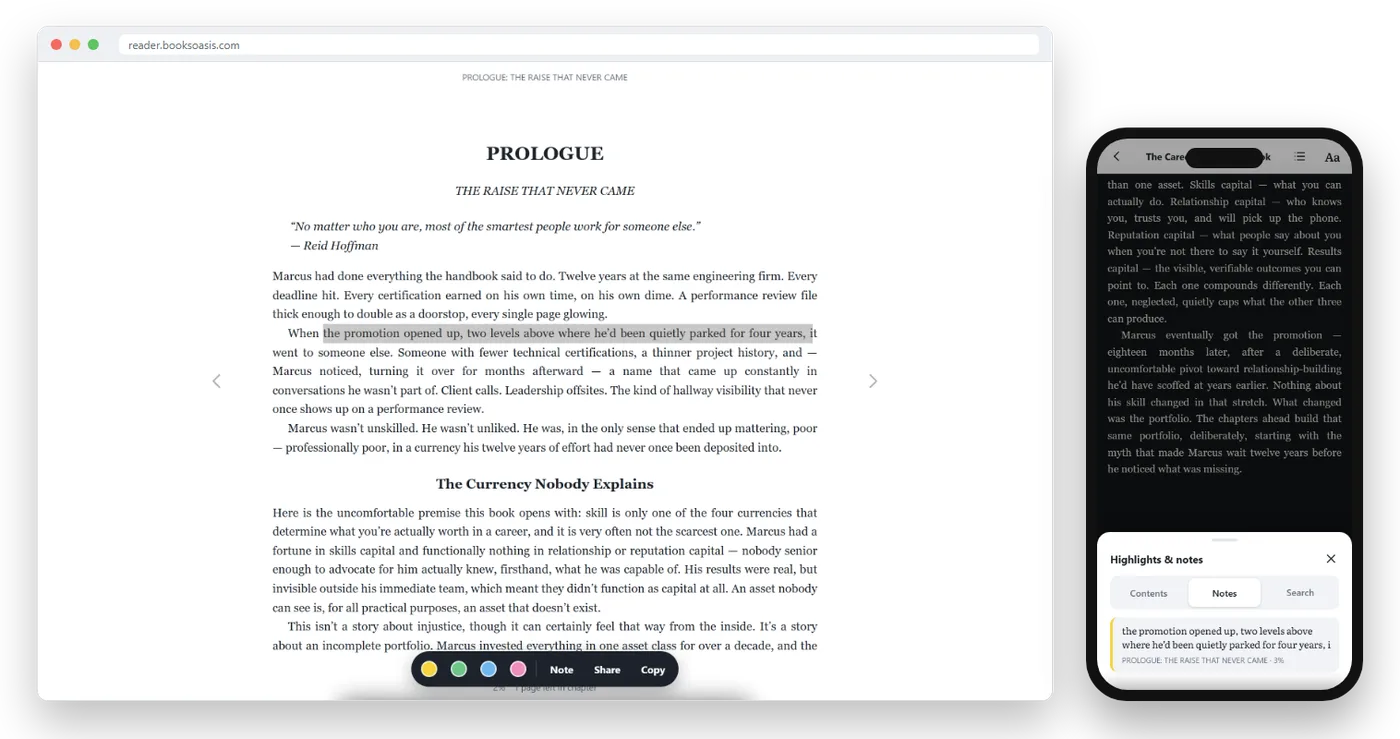
- Add to home screen on Android or iPhone, and it opens like an app.
- Offline: download a book once and read without a connection.
- Comfort: Light, Sepia and Dark themes, text size, fonts and spacing.
- Highlights and notes that follow you across devices.
- Deals: a daily deal, weekly offers and series bundles.
What BooksOasis does not do
- It does not take uploads of your own EPUB or PDF files.
- It does not import your Google Play Books library.
- It does not send books to Kindle, Kobo or Nook e-readers.
- Its catalog is smaller than Google's, with a focus on independent authors and small presses.
What happens to your Play Books library
Nothing changes as long as you keep your Google account. Your purchases and uploads stay in your library and keep working in Google Play Books on every device you sign in to.
| Book in your library | Can it move to another app? |
|---|---|
| Bought with DRM | No; read it in Google Play Books |
| Bought DRM-free | Yes; download the EPUB or PDF |
| Uploaded by you | Yes; use your original file |
| Audiobook | Stays in Google Play Books |
A good habit: keep your original files for anything you uploaded, in a folder or cloud drive you control. Then you can open them in any reader, whatever you decide later. It also protects you if an account is ever closed or a file is removed.
Keeping your uploads while you switch
- Gather your originals.Find the EPUB and PDF files you uploaded and keep them in one folder.
- Pick an e-ink reader, if you want one.A Kobo opens DRM-free EPUBs directly; Kindle accepts them through Send to Kindle.
- Keep Play Books for purchases.There's no need to delete anything.
- Buy new books where they fit best.Compare price, format and whether the book is part of a series deal.
Finding books you'll actually love
One common frustration with big app stores is discovery: a search box and a wall of covers. Stores run by booksellers tend to organize books more like a shop. On BooksOasis, you can browse by genre, see a book's whole series in one place, and buy the first three or the complete set at a series price. Our guides to buying an ebook series and finding ebook deals go further.
What each option costs
| Option | How you pay |
|---|---|
| Google Play Books | Buy each book |
| Kindle | Buy each book, or Kindle Unlimited at $11.99 a month (US) |
| Kobo | Buy each book, or a Kobo Plus plan |
| Apple Books | Buy each book |
| Libby | Free with a library card |
| BooksOasis | Buy each book, with daily deals, weekly offers and series bundles |
If you read two or three books a month, buying the ones you love and borrowing the rest is usually cheaper than a subscription. Kindle Unlimited alternatives walks through the sums.
Should you switch, or add a second store?
| If you... | Consider |
|---|---|
| Rely on uploading your own files | Keep Play Books; add a store for new books |
| Want a paper-like screen | Kobo, or Kindle |
| Have moved to iPhone and Mac | Apple Books or a browser reader |
| Read mostly library books | Libby |
| Love series and bargains | BooksOasis series bundles and daily deals |
| Read on a work computer | A browser reader: Play Books, Kindle for web or Oasis Reader |
Reading comfortably on Android
Whatever app you use, a few settings make phone reading easier on the eyes: a Sepia or Dark theme in the evening, a text size a step larger than feels necessary, a little extra line spacing, and Android's Eye comfort or Night Light setting after dark. Turning on Do Not Disturb while you read helps too. More in how to read ebooks on your phone.
If you listen as well as read
Google Play Books keeps audiobooks next to ebooks, which is convenient. If audiobooks matter to you, Kindle pairs with Audible, Kobo sells audiobooks in its apps, Apple Books sells both, and Libby lends both free. BooksOasis focuses on ebooks and print, so listeners usually pair it with Libby or another audiobook app.
Three readers, three choices
A student with a folder of course PDFs keeps Google Play Books for uploads and reads novels on a secondhand Kobo, copying DRM-free EPUBs across when she wants them on e-ink.
A commuter who reads on a Chromebook and an Android phone sticks with browser reading. He keeps Play Books for older purchases and buys new series from BooksOasis when a bundle price comes up, reading both in Chrome.
A retired teacher who reads a book every few days borrows most of them through Libby and buys only the ones she wants to keep and reread.
Google Play Books alternatives by reader type
| Reader | Best alternative |
|---|---|
| Wants a paper-like screen | Kobo or Kindle |
| Uploads lots of own files | Stay with Play Books; add Kobo for e-ink |
| Library regular | Libby |
| Reads a book a week | Kindle Unlimited or Kobo Plus, if your books are included |
| Loves series and deals | BooksOasis |
| All-Apple household | Apple Books |
For a wider comparison of reading apps, see the best ebook reader apps.
Books to start with
The bottom line
Google Play Books is flexible and hard to beat for your own uploads, so most readers keep it. Add Kobo or Kindle if you want e-ink, Libby if you borrow, Apple Books if you've gone fully Apple, and a store like BooksOasis for independent books, series bundles and daily deals you can read in the same browser.
Questions
Can I move my Google Play Books to another app?
Books you bought with DRM stay in Google Play Books. Some books are sold DRM-free and can be downloaded as EPUB or PDF files for other apps. Files you uploaded yourself are yours, so keep your originals.
How many books can I upload to Google Play Books?
Google allows up to 2,000 uploaded EPUB or PDF files, each under 100MB and without DRM.
What is the best Google Play Books alternative for e-ink?
Kobo and Kindle both make e-ink readers. Kobo e-readers open DRM-free EPUB files, so your own uploads can come with you.
Is there a Google Play Books alternative that works in a browser?
Yes. Kindle for web and Oasis Reader both run in a web browser, like Google Play Books does.
Does Google Play Books have a subscription?
No. Books are bought one at a time. Kindle Unlimited and Kobo Plus are the main all-you-can-read plans, and Libby lends books free with a library card.
Do BooksOasis ebooks work on Android?
Yes. You can download the Oasis Reader app for Android from reader.booksoasis.com, or read in Chrome and other Android browsers.
Do I lose my Google Play Books library if I switch?
No. Your purchases stay in your Google account, and you can keep reading them while you buy new books elsewhere.
Can I upload my own EPUB files to BooksOasis?
No. Oasis Reader is for books bought on BooksOasis. For your own files, keep using Google Play Books, or a reader that opens EPUBs such as a Kobo e-reader.
Which alternative is best for library books?
Libby. It lends ebooks and audiobooks free with a library card, on Android, iPhone and in a browser.
Can I use more than one ebook store?
Yes. Many readers keep Google Play Books for uploads and older purchases, and buy new books wherever the price, deal or book is best.
Can I read Google Play Books on an e-ink reader?
Not on Kindle or Kobo e-readers. Some Android-based e-ink tablets can install the Google Play Books app. For a standard e-reader, use DRM-free files or buy from that device's own store.
Is Google Play Books free?
The app is free and so is uploading your own files. You pay for the books you buy. The same is true of Kindle, Kobo, Apple Books and Oasis Reader apps, while Libby lends books free.
Add a second bookshelf in a minute
Buy an ebook and read it in any browser on your phone, tablet or computer.