Series and buying a whole series
How series pages work, and how to buy several ebooks from a series in one go without paying twice for books you already own.
Find a series
There are a few ways in:
- On a book page, a line such as "Book 2 of 5" links to the series the book belongs to.
- The homepage has a Best Series shelf, and the Series page lists them all.
- Search matches series names too, so typing a series name finds its books.
What a series page shows
At the top you will see the series name and how many books it has. Some series have a set reading order and are numbered; others are a collection you can read in any order.
Below that, every book is listed in reading order with its number, author and a short description. For each book you will see:
- The ebook price, with Buy ebook (or Pre-order ebook if it isn't out yet) and Add to cart.
- For a book that only comes in print, its lowest price and a See formats link to the book page.
- For an ebook you already own, In your library and a Read it link.
If you own any of the books, a Hide books I own box appears above the list. Tick it to see only the books you still need.
Buy several ebooks at once
The Get the series as ebooks box lets you buy a run of books in one checkout. Depending on how long the series is, you can choose:
- First 3, First 5 or First 10, whichever are shorter than the series
- All the ebooks in the series
Each option shows its price. The price is simply the total of the individual ebook prices at the time, so there is no extra charge for buying together. Select See included books to check exactly which books an option covers before you buy.
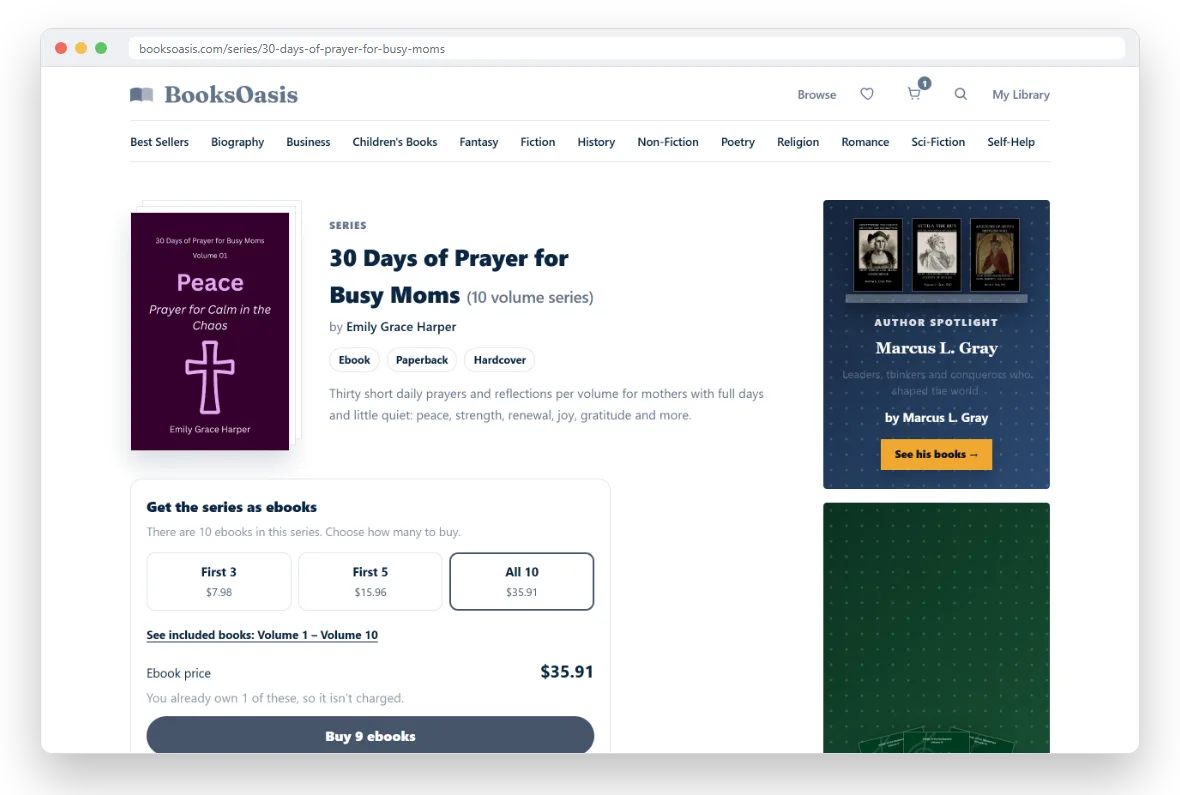
Books you already own are not charged
When you are signed in, the box knows which of the series' ebooks are already in your library. Those books are left out of the price and out of the order, and a note tells you how many you already own. If an option only contains books you own, it shows "Owned", and if you own every book the button reads "You own all of these".
Checkout checks this again on our side, so even if something changed in the meantime you will never be charged for an ebook you already have.
Check out
Select the Buy button (for example "Buy 3 ebooks"). You need to be signed in; if you aren't, you will be taken to sign in first. You then go straight to the payment page. Buying a series this way doesn't change your cart, so anything already in it stays there for later.
If some of the books are pre-orders, the box tells you so. Those arrive in your library on their release date, and the rest are ready to read as soon as you have paid.
Series on a book page
When you are looking at a book that belongs to a series, its page shows an Also in this series shelf with the other books and their numbers. It also has its own box for buying the series' ebooks, which starts on First 3 when the series has more than three books. It works exactly like the box on the series page.
Looking for your next series?
See every series in the store in one place.